
523 lines
27 KiB
Markdown
523 lines
27 KiB
Markdown
---
|
||
page-title: "Matrix.org - Understanding Synapse Hosting"
|
||
url: https://matrix.org/docs/older/understanding-synapse-hosting/
|
||
date: "2024-12-25 10:09:17"
|
||
---
|
||
## Older documentation
|
||
|
||
This documentation hasn't been updated in a while. Some information might no longer be valid.
|
||
|
||
There may be more up to date information in [the new documentation section](https://matrix.org/docs).
|
||
|
||
## Understanding Synapse Hosting
|
||
|
||
In this tutorial we’re going to deploy a synapse instance with docker-compose. This tutorial is about getting a first hands-on experience with Synapse, but it is **NOT** a guide to deploying Synapse in production. Some best practices are missing for a production server. If you want to deploy Synapse to production, you most probably want at least:
|
||
|
||
- Monitoring
|
||
- Backups
|
||
- Joining the Matrix rooms or subscribing to the mailing-lists/RSS feeds to know when one of the components you use has a new release
|
||
|
||
For production setups, please see the relevant doc on [https://matrix-org.github.io/synapse/latest/](https://matrix-org.github.io/synapse/latest/)
|
||
|
||
## Defining What We Want
|
||
|
||
When deploying our own instance, we need to define what domain we want for our user IDs and room aliases, and take care about not leaving the door open to abusers, even in small experimental deployments.
|
||
|
||
### How Our MatrixID Will Look Like
|
||
|
||
Two very important concepts for the end-user in matrix are user IDs and room IDs.
|
||
|
||
- A typical user ID would be `@john:example.org`. It’s made of a username (john) and a provider domain (example.org).
|
||
- A typical room address would be `#myroom:example.org`
|
||
|
||
Instead of example.org, we will want our own domain. In many cases, the root domain is already used to serve a website or another service. Some people decide to use a subdomain, like `matrix.example.org`, resulting in Matrix IDs following the format `@john:matrix.example.org`.
|
||
|
||
While this works in practice, the `matrix.` subdomain looks redundant: we’re already chatting on Matrix, no need to tell me the person is on Matrix. It’s possible to keep serving Synapse on `matrix.example.org` but to still have `@john:example.org` Matrix ID, thanks to [delegation of incoming traffic](https://github.com/matrix-org/synapse/blob/develop/docs/delegate.md).
|
||
|
||
Let’s be careful nonetheless: it’s not possible to change the domain of an instance! Once you deploy it with a domain, it’s forever. This is why we are going to set-up delegation of incoming traffic from the beginning, even if we don’t have anything else served on the root domain at the moment.
|
||
|
||
### Not Leaving the Door Open
|
||
|
||
When setting up a Synapse instance, leaving registrations completely open without any sort of verification is a good way to get our server abused as a spam vector and added to many other servers’ blocklist.
|
||
|
||
You probably either want to close registrations entirely, add email or captcha verification, or even better: only allow registrations for email addresses matching a certain pattern (e.g. to restrict registrations to everyone in your organisation as long as they have a @example.org email address).
|
||
|
||
In any case, by default Synapse won’t start if you leave registrations completely open without verification and without bypassing that security setting. In our example we’ll close registrations entirely, and create accounts manually.
|
||
|
||
### General Concepts
|
||
|
||
On the infrastructure level, we will need to have a machine exposed to the Internet, and a domain name. The simplest way to get these is to rent a VPS at a provider and buy a domain at a registrar. Renting the VPS and buying the domain will not be covered in this tutorial. For the sake of transparency, we used a VPS from the German provider [Netcup](https://www.netcup.eu/), and bought a domain from [Gandi](https://www.gandi.net/).
|
||
|
||
We’re also going to deploy Synapse using docker containers: one for Synapse itself, one for the database Synapse relies on, one for a web server required to set-up delegation of incoming traffic, and one for the reverse proxy.
|
||
|
||
The reverse proxy we’re going to use is traefik. It’s the entry door for incoming traffic on our server. We will use it to secure connections by retrieving a certificate automatically, and to route the calls to the proper containers.
|
||
|
||
Finally, given containers are stateless, we will need to rely on volumes to persist the data. This is where the data and configuration files are stored.
|
||
|
||
## The Bare Minimum We Need
|
||
|
||
### A VPS with a public IP
|
||
|
||
Capacity planning is a notably difficult task when hosting a service. In the case of Matrix, the CPU, RAM and disk space usage grows essentially with the number of high traffic rooms your users are in.
|
||
|
||
A 100 users deployment in a closed federation can still be considered a fairly small deployment. A five users deployment in open federation and with users in large traffic rooms such as Matrix HQ can be more resource intensive.
|
||
|
||
We’re not going to cover how to monitor resources usage and how to scale a deployment in this tutorial: the goal is to get a first hands-on deployment for fun, so we’re going to deploy it on a reasonably small VPS.
|
||
|
||
### Docker and docker-compose
|
||
|
||
We assume you know what docker and docker-compose are, and that they are installed on a fresh server. You can find the documentation for docker and docker compose [on docker’s documentation centre](https://docs.docker.com/compose/).
|
||
|
||
### A domain name
|
||
|
||
In this particular example we chose Gandi, but any registrar will do. Synapse needs a domain name to be able to build Matrix IDs and room aliases, and you need to be able to at least add A records (and ideally AAAA, which we’re not going to cover in this tutorial for the sake of simplicity).
|
||
|
||
## Let’s Get Our Hands Dirty!
|
||
|
||
### The Global Architecture
|
||
|
||
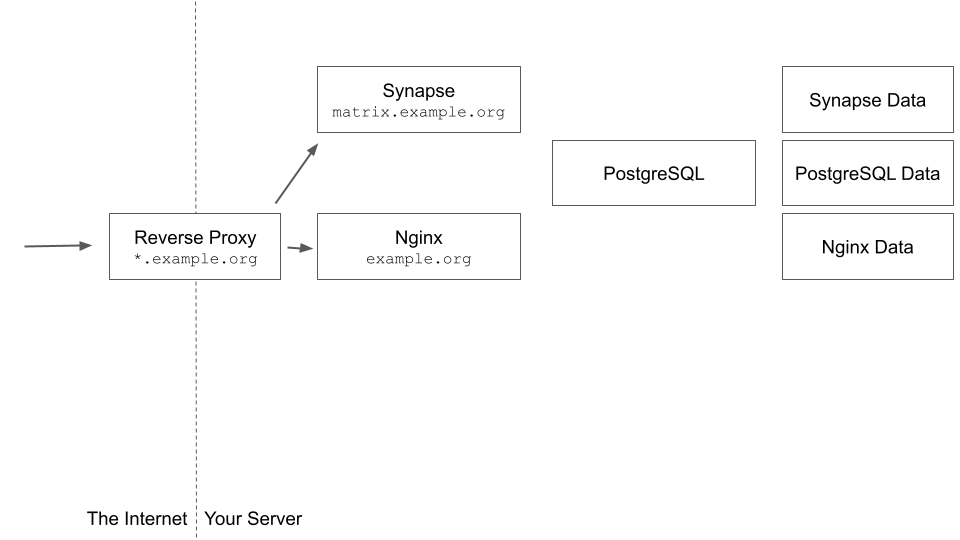
|
||
|
||
### Adding DNS records
|
||
|
||
Assuming your domain name is example.org, you need to add A records to your VPS for the following domains:
|
||
|
||
- example.org
|
||
- matrix.example.org
|
||
|
||
### docker-compose structure
|
||
|
||
A docker-compose file is used to describe what containers we want to set-up, what volumes they are going to rely on, and how to reach each container from the outside world.
|
||
|
||
Here is a dummy docker-compose file that only starts a nginx instance, for reference:
|
||
|
||
```
|
||
version: '3'
|
||
|
||
services:
|
||
|
||
nginx:
|
||
image: "nginx:1.23.1"
|
||
restart: "always"
|
||
volumes:
|
||
- nginx_conf:/etc/nginx/conf.d
|
||
|
||
volumes:
|
||
nginx_conf:
|
||
```
|
||
|
||
### Setting up a database
|
||
|
||
Let’s start by going to our home directory, and create a directory called `infra`. In that directory, we are going to create a docker-compose.yaml file with the following content. This will create a PostgreSQL database for our Synapse instance.
|
||
|
||
```
|
||
version: '3'
|
||
|
||
services:
|
||
|
||
synapse_db:
|
||
image: docker.io/postgres:14-alpine
|
||
restart: unless-stopped
|
||
environment:
|
||
- POSTGRES_USER=synapse
|
||
- POSTGRES_PASSWORD=aComplexPassphraseNobodyCanGuess
|
||
- POSTGRES_INITDB_ARGS=--encoding=UTF-8 --lc-collate=C --lc-ctype=C
|
||
volumes:
|
||
- synapse_db_data:/var/lib/postgresql/data
|
||
|
||
volumes:
|
||
synapse_db_data:
|
||
```
|
||
|
||
An important note here: storing credentials in plain text in the docker-compose file is a bad practice. If you want to use this set-up in the longer run, please check [docker compose and secrets](https://docs.docker.com/compose/compose-file/compose-file-v3/#secrets).
|
||
|
||
We can now start the container by running `docker-compose up -d`. We can check the container is running with docker ps:
|
||
|
||
```
|
||
[root@v2202112135873173933 infra]# docker ps
|
||
CONTAINER ID IMAGE COMMAND CREATED STATUS PORTS NAMES
|
||
8abcc08fa546 postgres:14-alpine "docker-entrypoint.s…" 14 seconds ago Up 13 seconds 5432/tcp infra-synapse_db-1
|
||
```
|
||
|
||
It may look like the database is open on the Internet… but it’s actually not. The container is listening on port 5432 on docker’s internal network. You can verify it’s not actually open by running `ss -tunlp`
|
||
|
||
```
|
||
[root@v2202112135873173933 infra]# ss -tunlp
|
||
Netid State Recv-Q Send-Q Local Address:Port Peer Address:Port Process
|
||
udp UNCONN 0 0 127.0.0.1:323 0.0.0.0:* users:(("chronyd",pid=735,fd=5))
|
||
udp UNCONN 0 0 [::1]:323 [::]:* users:(("chronyd",pid=735,fd=6))
|
||
tcp LISTEN 0 128 0.0.0.0:22 0.0.0.0:* users:(("sshd",pid=14338,fd=3))
|
||
tcp LISTEN 0 128 [::]:22 [::]:* users:(("sshd",pid=14338,fd=4))
|
||
```
|
||
|
||
And now let’s check the logs by running `docker logs infra-synapse_db-1`. The output should look like below:
|
||
|
||
```
|
||
[root@v2202112135873173933 infra]# docker logs -f infra-synapse_db-1
|
||
[…]
|
||
PostgreSQL init process complete; ready for start up.
|
||
|
||
2022-07-26 14:27:31.860 UTC [1] LOG: starting PostgreSQL 14.4 on x86_64-pc-linux-musl, compiled by gcc (Alpine 11.2.1_git20220219) 11.2.1 20220219, 64-bit
|
||
2022-07-26 14:27:31.860 UTC [1] LOG: listening on IPv4 address "0.0.0.0", port 5432
|
||
2022-07-26 14:27:31.860 UTC [1] LOG: listening on IPv6 address "::", port 5432
|
||
2022-07-26 14:27:31.861 UTC [1] LOG: listening on Unix socket "/var/run/postgresql/.s.PGSQL.5432"
|
||
2022-07-26 14:27:31.863 UTC [50] LOG: database system was shut down at 2022-07-26 14:27:31 UTC
|
||
2022-07-26 14:27:31.866 UTC [1] LOG: database system is ready to accept connections
|
||
```
|
||
|
||
We can check if the user synapse was created by trying to connect to the database. To do so, let’s get the shell inside the postgresql container by running `docker exec -it infra_synapse_db_1 /bin/bash`. We should now be able to use the built-in SQL client by running `psql -U synapse -W`. We will be prompted for our password. We need to use the `POSTGRES_PASSWORD` declared in the docker-compose file. The output should look like as follows
|
||
|
||
```
|
||
bash-5.1# psql -U synapse -W Password: psql (14.4) Type "help" for help.
|
||
|
||
synapse=#
|
||
```
|
||
|
||
We can close the sql client by simultaneously pressing the Ctrl and D keys, which will get us back to the postgresql docker container prompt. We can exit it too by pressing Ctrl and D once again.
|
||
|
||
### Setting up Synapse
|
||
|
||
It’s now time to set up Synapse itself! First of all, we need to generate a sample configuration file for our homeserver. To do so, let’s ask a disposable synapse container to generate the sample configuration file for us. You only need to edit the value of the SYNAPSE\_SERVER\_NAME to the value you want for the server part of your Matrix IDs, and SYNAPSE\_REPORT\_STATS depending on whether you want to report anonymous stats or not.
|
||
|
||
```
|
||
[root@v2202112135873173933 infra]# docker run -it --rm --mount type=volume,src=infra_synapse_data,dst=/data -e SYNAPSE_SERVER_NAME=example.org -e SYNAPSE_REPORT_STATS=yes matrixdotorg/synapse:v1.63.0 generate
|
||
Setting ownership on /data to 991:991
|
||
Creating log config /data/example.org.log.config
|
||
Generating config file /data/homeserver.yaml
|
||
Generating signing key file /data/example.org.signing.key
|
||
A config file has been generated in '/data/homeserver.yaml' for server name 'example.org'. Please review this file and customise it to your needs.
|
||
```
|
||
|
||
The container generated several files. The first one we’re going to have a look at is the homeserver.yaml file, which contains all the basic information to allow our server to run. Docker volumes data is located in `/var/lib/docker/volumes/your_volume_name/_data`. We asked this container to generate the files in the `infra_synapse_data` volumes. Let’s have a look at `/var/lib/docker/volumes/infra_synapse_data/_data/homeserver.yaml` and see what it contains:
|
||
|
||
```
|
||
server_name: "example.org"
|
||
pid_file: /data/homeserver.pid
|
||
listeners:
|
||
- port: 8008
|
||
tls: false
|
||
type: http
|
||
x_forwarded: true
|
||
resources:
|
||
- names: [client, federation]
|
||
compress: false
|
||
database:
|
||
name: sqlite3
|
||
args:
|
||
database: /data/homeserver.db
|
||
log_config: "/data/example.org.log.config"
|
||
media_store_path: /data/media_store
|
||
registration_shared_secret: "REDACTED"
|
||
report_stats: true
|
||
macaroon_secret_key: "REDACTED"
|
||
form_secret: "REDACTED"
|
||
signing_key_path: "/data/example.org.signing.key"
|
||
trusted_key_servers:
|
||
- server_name: "matrix.org"
|
||
```
|
||
|
||
What a pleasant surprise, it’s fairly short! Synapse indeed tries to have safe and sane defaults, and allows administrators to add options to tweak their configuration if they needed. The complete reference of every single option and what they do can be found at [https://matrix-org.github.io/synapse/latest/usage/configuration/index.html](https://matrix-org.github.io/synapse/latest/usage/configuration/index.html)
|
||
|
||
And the good news is that we are just going to edit the database section: we’re going to make Synapse connect to the PostgreSQL database we have set up earlier. [According to Synapse’s documentation](https://matrix-org.github.io/synapse/latest/usage/configuration/config_documentation.html#database), we need to edit the database section so it looks like the following instead of the sql3 default:
|
||
|
||
```
|
||
database:
|
||
name: psycopg2
|
||
txn_limit: 10000
|
||
args:
|
||
user: synapse
|
||
password: aComplexPassphraseNobodyCanGuess
|
||
database: synapse
|
||
host: infra-synapse_db-1
|
||
port: 5432
|
||
cp_min: 5
|
||
cp_max: 10
|
||
```
|
||
|
||
We can save the file. Let’s edit our docker-compose.yaml file to add Synapse, and give it the volumes it needs to persist data:
|
||
|
||
```
|
||
version: '3'
|
||
|
||
services:
|
||
|
||
synapse:
|
||
image: docker.io/matrixdotorg/synapse:v1.63.0
|
||
restart: unless-stopped
|
||
environment:
|
||
- SYNAPSE_CONFIG_PATH=/data/homeserver.yaml
|
||
volumes:
|
||
- synapse_data:/data
|
||
depends_on:
|
||
- synapse_db
|
||
|
||
synapse_db:
|
||
image: docker.io/postgres:14-alpine
|
||
restart: unless-stopped
|
||
environment:
|
||
- POSTGRES_USER=synapse
|
||
- POSTGRES_PASSWORD=aComplexPassphraseNobodyCanGuess
|
||
- POSTGRES_INITDB_ARGS=--encoding=UTF-8 --lc-collate=C --lc-ctype=C
|
||
volumes:
|
||
- synapse_db_data:/var/lib/postgresql/data
|
||
|
||
volumes:
|
||
synapse_data:
|
||
synapse_db_data:
|
||
```
|
||
|
||
We can now start Synapse by entering `docker compose up -d` and monitor what is happening with `docker logs -f infra-synapse-1`. It should give us pretty verbose output, as follows:
|
||
|
||
```
|
||
[root@v2202112135873173933 infra]# docker logs -f infra-synapse-1
|
||
Starting synapse with args -m synapse.app.homeserver --config-path /data/homeserver.yaml
|
||
This server is configured to use 'matrix.org' as its trusted key server via the
|
||
'trusted_key_servers' config option. 'matrix.org' is a good choice for a key
|
||
server since it is long-lived, stable and trusted. However, some admins may
|
||
wish to use another server for this purpose.
|
||
|
||
To suppress this warning and continue using 'matrix.org', admins should set
|
||
'suppress_key_server_warning' to 'true' in homeserver.yaml.
|
||
--------------------------------------------------------------------------------
|
||
2022-07-26 15:35:47,966 - root - 343 - WARNING - main - ***** STARTING SERVER *****
|
||
2022-07-26 15:35:47,966 - root - 344 - WARNING - main - Server /usr/local/lib/python3.9/site-packages/synapse/app/homeserver.py version 1.63.0
|
||
2022-07-26 15:35:47,966 - root - 349 - INFO - main - Server hostname: chipchop.org
|
||
2022-07-26 15:35:47,966 - root - 350 - INFO - main - Instance name: master
|
||
2022-07-26 15:35:47,966 - synapse.app.homeserver - 377 - INFO - main - Setting up server
|
||
2022-07-26 15:35:47,966 - synapse.server - 306 - INFO - main - Setting up.
|
||
2022-07-26 15:35:47,967 - synapse.storage.databases - 66 - INFO - main - [database config 'master']: Checking database server
|
||
2022-07-26 15:35:47,967 - synapse.storage.databases - 69 - INFO - main - [database config 'master']: Preparing for databases ['main', 'state']
|
||
2022-07-26 15:35:47,967 - synapse.storage.prepare_database - 115 - INFO - main - ['main', 'state']: Checking existing schema version
|
||
2022-07-26 15:35:47,968 - synapse.storage.prepare_database - 145 - INFO - main - ['main', 'state']: Initialising new database
|
||
2022-07-26 15:35:48,009 - synapse.storage.prepare_database - 411 - INFO - main - Applying schema deltas for v55
|
||
2022-07-26 15:35:48,010 - synapse.storage.prepare_database - 519 - INFO - main - Applying schema 55/access_token_expiry.sql
|
||
2022-07-26 15:35:48,012 - synapse.storage.prepare_database - 519 - INFO - main - Applying schema 55/track_threepid_validations.sql
|
||
2022-07-26 15:35:48,012 - synapse.storage.prepare_database - 519 - INFO - main - Applying schema 55/users_alter_deactivated.sql
|
||
[…]
|
||
```
|
||
|
||
We can quit watching the logs by pressing the Ctrl and C keys simultaneously. Voilà! We have a Synapse instance using our PostgreSQL database. Now we need to expose it properly on the internet, and set-up the delegation of incoming traffic.
|
||
|
||
### Serving the .well-known files
|
||
|
||
So far, we have configured our Synapse instance, but it’s not exposed on the Internet at all. It can only be accessed from within the docker network. While we specified the Synapse instance is going to generate Matrix IDs with “example.org” as a server part, we won’t expose the Synapse instance on the root domain itself. If the domain was exclusively used for Matrix that could work. But if we want to host a website on example.org, then we need to expose our Matrix instance somewhere else.
|
||
|
||
We are going to expose our instance on matrix.example.org. We need a way to tell other members of the federation that even if our Matrix IDs are on example.org, the actual technical server is on matrix.example.org: this is what delegation of incoming traffic is for.
|
||
|
||
This can be done by serving two static files:
|
||
|
||
- example.org/.well-known/matrix/server and
|
||
- example.org/.well-known/matrix/client
|
||
|
||
One simple way to do it is to set-up a nginx homeserver and to instruct it to serve those files directly in its configuration file. Let’s add the nginx server in our docker-compose file:
|
||
|
||
```
|
||
version: '3'
|
||
|
||
services:
|
||
|
||
nginx:
|
||
image: "nginx:1.22.0"
|
||
restart: "always"
|
||
volumes:
|
||
- nginx_conf:/etc/nginx/conf.d
|
||
|
||
synapse:
|
||
image: docker.io/matrixdotorg/synapse:v1.63.0
|
||
restart: unless-stopped
|
||
environment:
|
||
- SYNAPSE_CONFIG_PATH=/data/homeserver.yaml
|
||
volumes:
|
||
- synapse_data:/data
|
||
depends_on:
|
||
- synapse_db
|
||
|
||
synapse_db:
|
||
image: docker.io/postgres:14-alpine
|
||
restart: unless-stopped
|
||
environment:
|
||
- POSTGRES_USER=synapse
|
||
- POSTGRES_PASSWORD=aComplexPassphraseNobodyCanGuess
|
||
- POSTGRES_INITDB_ARGS=--encoding=UTF-8 --lc-collate=C --lc-ctype=C
|
||
volumes:
|
||
- synapse_db_data:/var/lib/postgresql/data
|
||
|
||
volumes:
|
||
nginx_conf:
|
||
synapse_data:
|
||
synapse_db_data:
|
||
```
|
||
|
||
We can then start the container for it to populate the `nginx_conf` volume with `docker compose up -d`
|
||
|
||
Let’s now edit the /var/lib/docker/volumes/infra\_nginx\_conf/\_data/default.conf file, to add the following at the bottom of the file right before the closing `}`:
|
||
|
||
```
|
||
location /.well-known/matrix/server {
|
||
access_log off;
|
||
add_header Access-Control-Allow-Origin *;
|
||
default_type application/json;
|
||
return 200 '{"m.server": "matrix.example.org:443"}';
|
||
}
|
||
|
||
location /.well-known/matrix/client {
|
||
access_log off;
|
||
add_header Access-Control-Allow-Origin *;
|
||
default_type application/json;
|
||
return 200 '{"m.homeserver": {"base_url": "https://matrix.example.org"}}';
|
||
}
|
||
```
|
||
|
||
We can now restart the nginx container with docker restart infra-nginx-1. Given the server is not exposed outside of the docker network, we need to get a prompt inside the container to check the files are properly served. We can get it with `docker exec -it infra-nginx-1 /bin/bash`
|
||
|
||
Once inside the container, we can use curl to ask for these files:
|
||
|
||
```
|
||
root@66a61467b9ba:/# curl -X GET "http://localhost/.well-known/matrix/server"
|
||
{"m.server": "matrix.example.org:443"}
|
||
root@66a61467b9ba:/# curl -X GET "http://localhost/.well-known/matrix/client"
|
||
{"m.homeserver":{"base_url": "https://matrix.example.org"}}
|
||
```
|
||
|
||
We can now exit the container prompt by pressing the Ctrl and D keys simultaneously.
|
||
|
||
### Exposing on the Internet with a Reverse Proxy
|
||
|
||
Everything is in place, now we only have to expose the relevant bits of our infrastructure on the Internet! This mainly means the nginx server, and the Synapse instance. Of course, we want to keep our database private and only accessible by containers within the docker network.
|
||
|
||
To do so we’re going to rely on traefik, which adds a lot of sugar when it comes to routing external calls to the right containers. Traefik also handles the Let’s Encrypt certificates management to make sure the traffic remains encrypted and that our certificates never expire.
|
||
|
||
The first thing we need to do is to add a traefik container in our docker-compose file, to map the docker socket to the traefik container so it can do its magic, and to give it a volume so it can store the certificates and associated keypairs. Our docker-compose file should look like below. Make sure to update the `certificatesresolvers.letls.acme.email` label to an email address where you can be reached out to.
|
||
|
||
```
|
||
version: '3'
|
||
|
||
services:
|
||
|
||
traefik:
|
||
image: "traefik"
|
||
restart: "always"
|
||
command:
|
||
- "--api=true"
|
||
- "--providers.docker=true"
|
||
- "--providers.docker.exposedbydefault=false"
|
||
- "--entrypoints.web.address=:80"
|
||
- "--entrypoints.websecure.address=:443"
|
||
- "--certificatesresolvers.letls.acme.email=admin@example.org"
|
||
- "--certificatesresolvers.letls.acme.storage=/certs/acme.json"
|
||
- "--certificatesresolvers.letls.acme.httpchallenge=true"
|
||
- "--certificatesresolvers.letls.acme.httpchallenge.entrypoint=web"
|
||
ports:
|
||
- "443:443"
|
||
- "80:80"
|
||
volumes:
|
||
- "/var/run/docker.sock:/var/run/docker.sock:ro"
|
||
- "traefik_certs:/certs"
|
||
|
||
nginx:
|
||
image: "nginx:1.22.0"
|
||
restart: "always"
|
||
volumes:
|
||
- nginx_conf:/etc/nginx/conf.d
|
||
|
||
synapse:
|
||
image: docker.io/matrixdotorg/synapse:v1.63.0
|
||
restart: unless-stopped
|
||
environment:
|
||
- SYNAPSE_CONFIG_PATH=/data/homeserver.yaml
|
||
volumes:
|
||
- synapse_data:/data
|
||
depends_on:
|
||
- synapse_db
|
||
|
||
synapse_db:
|
||
image: docker.io/postgres:14-alpine
|
||
restart: unless-stopped
|
||
environment:
|
||
- POSTGRES_USER=synapse
|
||
- POSTGRES_PASSWORD=aComplexPassphraseNobodyCanGuess
|
||
- POSTGRES_INITDB_ARGS=--encoding=UTF-8 --lc-collate=C --lc-ctype=C
|
||
volumes:
|
||
- synapse_db_data:/var/lib/postgresql/data
|
||
|
||
volumes:
|
||
traefik_certs:
|
||
nginx_conf:
|
||
synapse_data:
|
||
synapse_db_data:
|
||
```
|
||
|
||
Now let’s check traefik is actually listening to the outside world with `ss -tunlp`:
|
||
|
||
```
|
||
[root@v2202112135873173933 infra]# ss -tunlp
|
||
Netid State Recv-Q Send-Q Local Address:Port Peer Address:Port Process
|
||
udp UNCONN 0 0 127.0.0.1:323 0.0.0.0:* users:(("chronyd",pid=735,fd=5))
|
||
udp UNCONN 0 0 [::1]:323 [::]:* users:(("chronyd",pid=735,fd=6))
|
||
tcp LISTEN 0 4096 0.0.0.0:443 0.0.0.0:* users:(("docker-proxy",pid=110990,fd=4))
|
||
tcp LISTEN 0 4096 0.0.0.0:80 0.0.0.0:* users:(("docker-proxy",pid=111025,fd=4))
|
||
tcp LISTEN 0 128 0.0.0.0:22 0.0.0.0:* users:(("sshd",pid=14338,fd=3))
|
||
tcp LISTEN 0 4096 [::]:443 [::]:* users:(("docker-proxy",pid=110997,fd=4))
|
||
tcp LISTEN 0 4096 [::]:80 [::]:* users:(("docker-proxy",pid=111032,fd=4))
|
||
tcp LISTEN 0 128 [::]:22 [::]:* users:(("sshd",pid=14338,fd=4))
|
||
```
|
||
|
||
Fantastic! But that’s only the first step: traefik does listen to the outside world, but it doesn’t know where to route calls yet. For that we’re going to rely on labels. Let’s start with something straightforward: we’re going to route all the calls to our root domain example.org to the nginx container serving the `.well-known` files.
|
||
|
||
The nginx section of our docker-compose file should look like below. Of course, adapt the labels to your own domain.
|
||
|
||
```
|
||
nginx:
|
||
image: "nginx:1.22.0"
|
||
restart: "always"
|
||
volumes:
|
||
- nginx_conf:/etc/nginx/conf.d
|
||
labels:
|
||
- "traefik.enable=true"
|
||
- "traefik.http.routers.nginx.entrypoints=websecure"
|
||
- "traefik.http.routers.nginx.rule=Host(`example.org`)"
|
||
- "traefik.http.routers.nginx.tls=true"
|
||
- "traefik.http.routers.nginx.tls.certresolver=letls"
|
||
```
|
||
|
||
We can then restart containers with `docker compose up -d`. Traefik might need a few minutes to retrieve the certificates, but you should now be able to reach [https://example.org/.well-known/matrix/server](https://example.org/.well-known/matrix/server) and [https://example.org/.well-known/matrix/client](https://example.org/.well-known/matrix/client) from your browser! Wee!
|
||
|
||
Let’s now expose Synapse on its technical URL as well by adding some labels in the docker-compose file. The synapse section should look like below. Of course, here again adapt the labels to your own domain.
|
||
|
||
```
|
||
synapse:
|
||
image: docker.io/matrixdotorg/synapse:v1.63.0
|
||
restart: unless-stopped
|
||
environment:
|
||
- SYNAPSE_CONFIG_PATH=/data/homeserver.yaml
|
||
volumes:
|
||
- synapse_data:/data
|
||
depends_on:
|
||
- synapse_db
|
||
labels:
|
||
- traefik.enable=true
|
||
- traefik.http.routers.synapse.entrypoints=websecure
|
||
- traefik.http.routers.synapse.rule=Host(`matrix.example.org`)
|
||
- traefik.http.routers.synapse.tls=true
|
||
- traefik.http.routers.synapse.tls.certresolver=letls
|
||
```
|
||
|
||
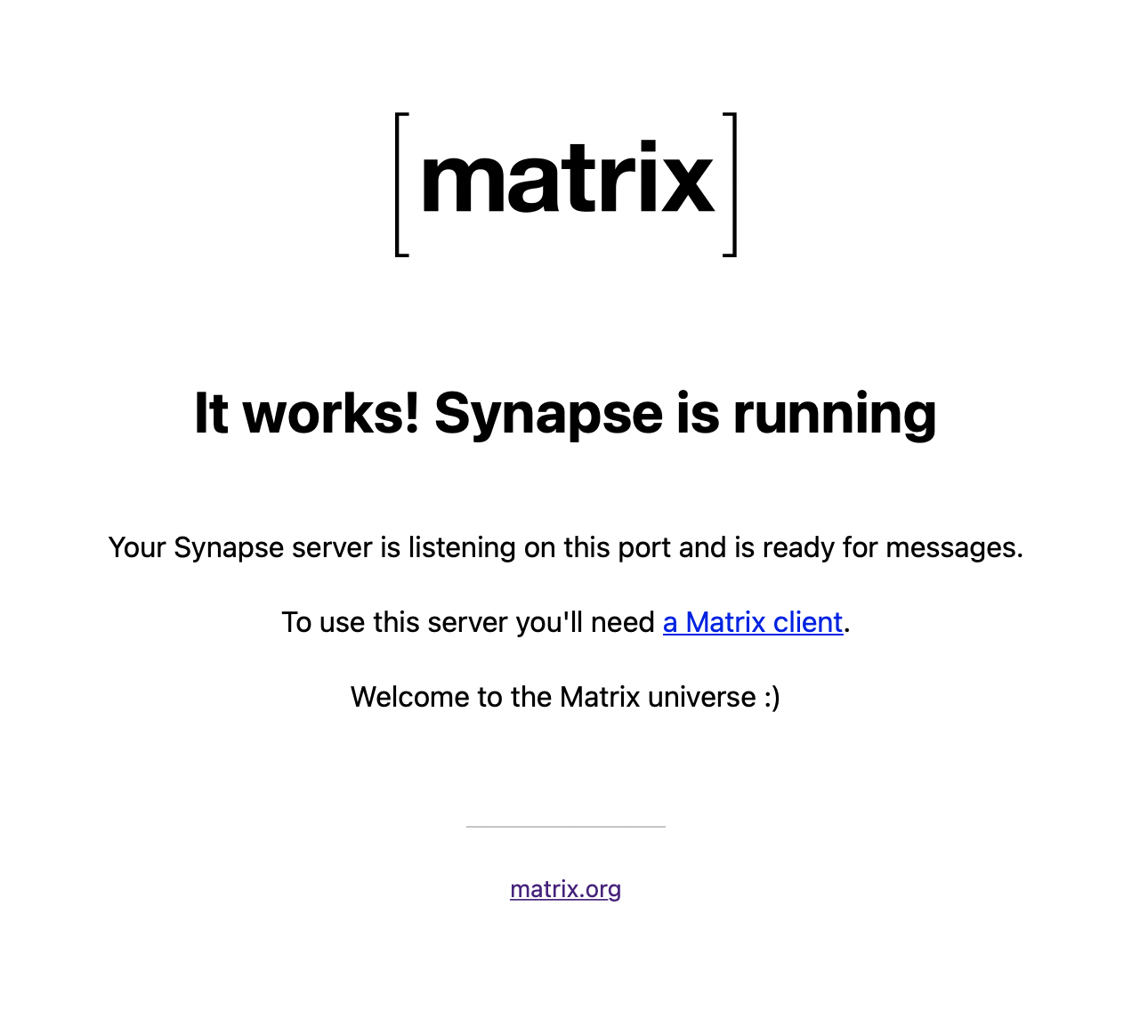
We can try to reach https://matrix.example.org… and it should answer!
|
||
|
||
|
||
|
||
### Creating an account, and logging in
|
||
|
||
It looks like our server is online, that’s fantastic! Let’s connect to our new Matrix account then! But wait… registrations are closed by default on Synapse. We can’t register using a web client. Let’s get a prompt in the Synapse container with `docker exec -it infra-synapse-1 /bin/bash` to manually register a new user using the `register_new_matrix_user -c /data/homeserver.yaml http://localhost:8008` command:
|
||
|
||
```
|
||
root@e752d46bc5f2:/# register_new_matrix_user -c /data/homeserver.yaml http://localhost:8008
|
||
New user localpart [root]: myuserid
|
||
Password:
|
||
Confirm password:
|
||
Make admin [no]:
|
||
Sending registration request...
|
||
Success!
|
||
```
|
||
|
||
Voilà! We can now head to [https://app.element.io](https://app.element.io/), select our example.org domain instead of matrix.org, and log in with this new account! Congratulations, you set-up your own homeserver the hard way! |