
692 lines
35 KiB
Markdown
692 lines
35 KiB
Markdown
---
|
||
page-title: "Live website updates with Go, SSE, and htmx"
|
||
url: https://threedots.tech/post/live-website-updates-go-sse-htmx/
|
||
date: "2024-07-23 07:59:41"
|
||
---
|
||
In case you missed the memo, the Single Page Application hype period is over, and we’re now back to PHP and jQuery, I mean rendering HTML on the server. I’m excited! It brings me back to the early 2000s when we were all web developers, not frontend or backend engineers.
|
||
|
||
But there’s one thing I would miss from the SPA era: **live updates**. The classic websites often relied on the “refresh” button, which wasn’t that great. While polling for updates periodically is a solution, it’s inefficient. It’s much better to push updates to the client once they happen.
|
||
|
||
This post shows how to push live updates to your website using Go, Server-Sent Events (SSE), and htmx. As the example project, I use a tiny microblogging website where you can react to posts.
|
||
|
||
Below, you can see the embedded example in two “windows”. You can click on reactions and see them update in real-time in the other window. You will also see the reactions and views counters update as other readers interact with the posts. (You can open the example in a new tab [here](https://sse-example.threedots.tech/)).
|
||
|
||
## Server-Sent Events
|
||
|
||
WebSockets seem like the most popular option for pushing live updates from the HTTP server to the browser. Meanwhile, Server-Sent Events (SSE) is a great alternative. It is simple to set up and good enough for many use cases. It uses standard HTTP connections, so you don’t need a custom protocol. All modern browsers support SSE.
|
||
|
||
SSE endpoints work just like standard HTTP endpoints with a slight twist. You set the `Content-Type` header to `text/event-stream` and keep writing data in a text format like this:
|
||
|
||
```
|
||
event: notifications
|
||
data: {"unread_messages": 14}
|
||
|
||
event: message
|
||
data: <h1>Hello,
|
||
data: world!</h1>
|
||
```
|
||
|
||
What follows the `event:` line is an optional event *type*, which can be any string you want. The multiline `data` field is the payload sent to the browser. Every “event” is separated by an extra new line. The specification mentions a few more things, but that’s all you need to start.
|
||
|
||
In Go, SSE endpoints are slightly different from `net/http` endpoints because you don’t just write data to the `ResponseWriter` and return from the function. Instead, you reply with the status code (`200 OK`) and keep writing the “events” in the format above. The connection stays alive until the client (the browser) closes it.
|
||
|
||
Here’s a complete example of sending back a “ping” event every 10 seconds.
|
||
|
||
```
|
||
func main() {
|
||
http.HandleFunc("/ping", func(w http.ResponseWriter, r *http.Request) {
|
||
w.Header().Set("Content-Type", "text/event-stream")
|
||
w.WriteHeader(http.StatusOK)
|
||
|
||
for {
|
||
select {
|
||
case <-r.Context().Done():
|
||
return
|
||
default:
|
||
}
|
||
|
||
fmt.Fprintf(w, "data: ping\n\n")
|
||
|
||
if f, ok := w.(http.Flusher); ok {
|
||
f.Flush()
|
||
}
|
||
|
||
time.Sleep(10 * time.Second)
|
||
}
|
||
})
|
||
|
||
http.ListenAndServe(":8080", nil)
|
||
}
|
||
```
|
||
|
||
Two things are worth mentioning here.
|
||
|
||
- To avoid buffering, we use the `http.Flusher` to send the response immediately.
|
||
- To exit the infinite loop, we check if the request’s context is done.
|
||
|
||
On the client side, you can handle it like this:
|
||
|
||
```
|
||
<script>
|
||
const es = new EventSource("http://localhost:8080/ping");
|
||
es.onmessage = (event) => {
|
||
console.log(`Received: ${event.data}`);
|
||
};
|
||
</script>
|
||
```
|
||
|
||
Most online tutorials end here and wish you happy coding. Perhaps it’s good enough if you want to create a demo project in one afternoon. But the example is far from something you would use in production. I don’t want you to read this post, then go back to your project and think, “Uhh, so what do I do now?”
|
||
|
||
If you follow our blog, you know we like to focus on real-world examples. Let’s see how to use SSE in a more complex scenario — the microblog example you saw at the top of this page. It’s not quick and easy, and there are many things to consider, but it should make you comfortable enough to use a similar mechanism in your projects.
|
||
|
||
Don't miss new posts.
|
||
Join over 15k subscribers of our newsletter and get a [**free e-book**](https://threedots.tech/go-with-the-domain/)!
|
||
|
||
[
|
||
|
||

|
||
|
||
## Go With The Domain Three Dots Labs
|
||
|
||
|
||
|
||
](https://threedots.tech/go-with-the-domain/)
|
||
|
||
🔒 We do not send spam. You can unsubscribe at any time!
|
||
|
||
## The Microblog Example
|
||
|
||
The core component of the example is a “post”. The key feature is that the reactions and views are updated in real-time as other users interact with the post.
|
||
|
||
In this example, we’ll render HTML on the server side, using no JavaScript code for interactivity except the htmx library.
|
||
|
||
The complete example is on [GitHub](https://github.com/ThreeDotsLabs/watermill/tree/master/_examples/real-world-examples/server-sent-events-htmx). You can run it locally using docker-compose.
|
||
|
||
### JSON API Example
|
||
|
||
For another example featuring a Twitter-like web app, see the [server-sent-events](https://github.com/ThreeDotsLabs/watermill/tree/master/_examples/real-world-examples/server-sent-events) example on the Watermill repository. It shows a similar approach using a Single Page Application with Vue.js and a JSON API.
|
||
|
||
### Tools used
|
||
|
||
Here’s the stack I use in the example. I won’t dive deep into all the components, but I’ll mention them briefly here.
|
||
|
||
- [**Echo**](https://echo.labstack.com/) — a lightweight HTTP router I like for error handling that is simpler than in `net/http`.
|
||
- [**templ**](https://templ.guide/) — an HTML templates library based on code generation. It can get weird at times, but overall, I’m happy with it and like it more than `html/template`. It’s best used together with an IDE plugin.
|
||
- [**htmx**](https://htmx.org/) — a library for using AJAX and SSE with no need to write JavaScript.
|
||
- [**Watermill**](https://watermill.io/) — an event-driven library we maintain for working with messages.
|
||
- **PostgreSQL** and **Google Cloud Pub/Sub** for storage and messaging infrastructure. (You can choose a different Pub/Sub for messaging, even Postgres.)
|
||
|
||
## Deciding what and when to push
|
||
|
||
When designing an SSE endpoint, you must decide *what* the payload should be, *when* to send an update, and to *whom* to send it.
|
||
|
||
### What
|
||
|
||
The payload is just text, and it’s up to you how to encode it. It can be a regular JSON API response or an HTML you would embed directly on the website. Remember that each line should have the `data:` prefix, and the payload needs to end with two new lines (`\n\n`).
|
||
|
||
### When
|
||
|
||
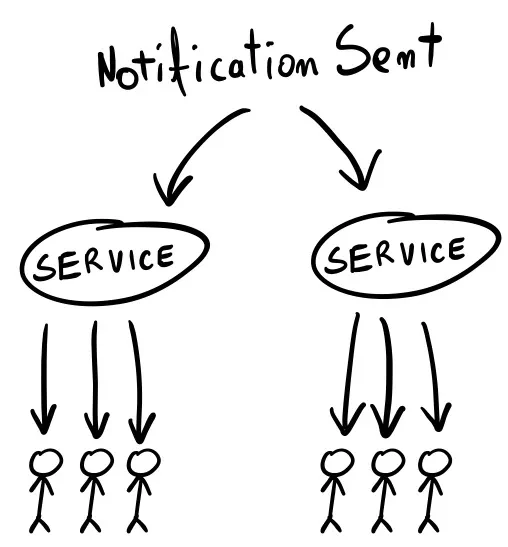
You need a way to know when something changes in your application so you can push the updates. For example, if the user receives a message, you show a red bubble in the UI.
|
||
|
||
The SSE endpoints are long-running, so you may have hundreds or thousands of goroutines running in the background that you must notify of the change. In reaction, each should send an event to the client. Since you’re likely running more than one instance of your service, this can’t work in memory.
|
||
|
||
|
||
|
||
### To Whom
|
||
|
||
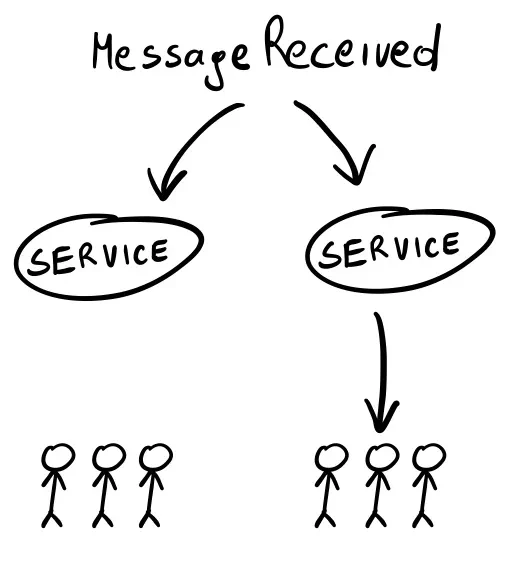
You often only want to notify some users of something that happened. If I send you a message, I expect a notification to appear on your screen, but not for anyone else. So, you need a way to filter what happens and choose who should get the update (and which SSE endpoints to trigger).
|
||
|
||
|
||
|
||
In this example, it goes as follows:
|
||
|
||
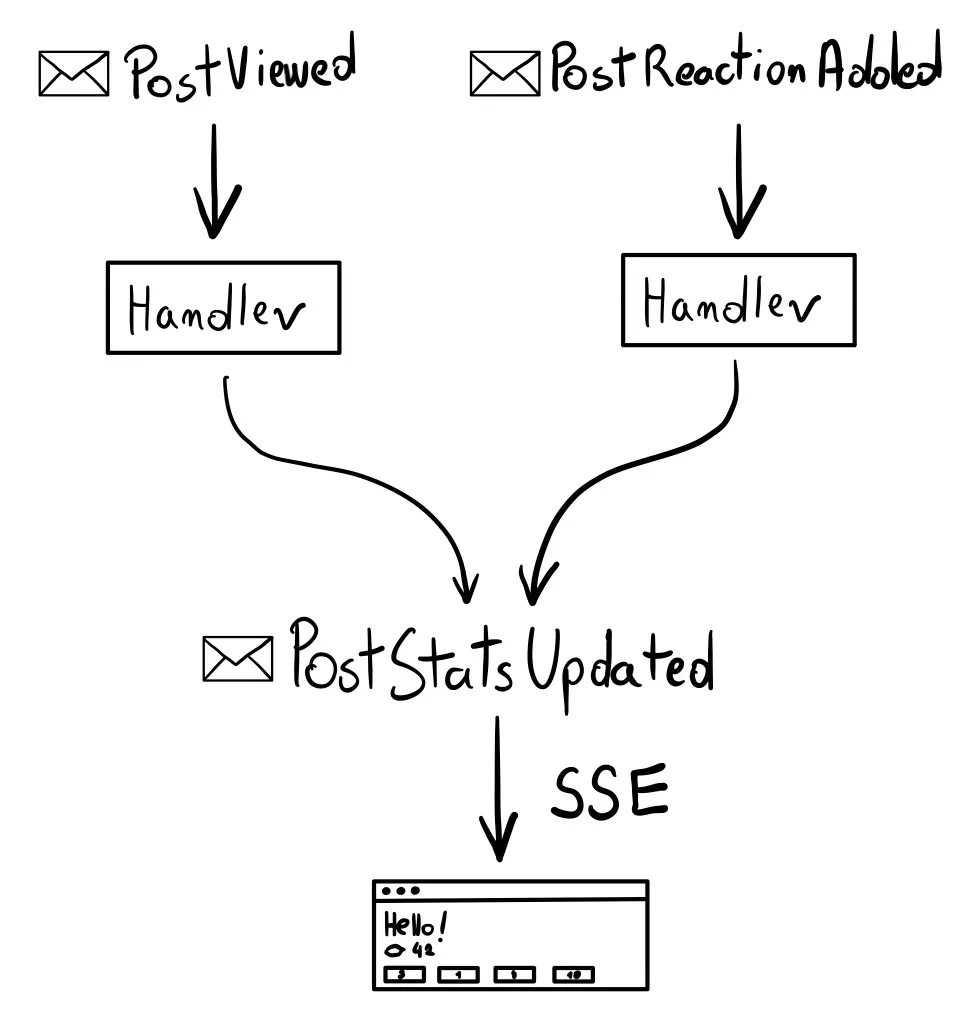
- **What:** the post “stats” model, including the numbers of views and reactions as HTML.
|
||
- **When:** when someone sees the post or reacts to it.
|
||
- **To Whom:** everyone who sees the updated post. Other posts are not updated.
|
||
|
||
|
||
|
||
## Implementing SSE Endpoints
|
||
|
||
While you absolutely can create SSE endpoints from scratch (or with a library), and it’s not that complex, the hard part is triggering the updates in reaction to something that happened. (And doing this over the network since running a single service instance rarely happens in production.) As with running an HTTP server, **you don’t want to reinvent the wheel here.**
|
||
|
||
We usually approach anything events-related with [Watermill](https://watermill.io/). It’s a Go library we maintain that abstracts away the low-level details of Pub/Subs. (Getting close to 7k GitHub stars ⭐️). You can use it with any existing codebase as it’s not a framework but a lightweight library (just like htmx). It supports many Pub/Subs, so it’s easy to start with the infrastructure you already have (even an SQL database).
|
||
|
||
### Watermill Primer
|
||
|
||
(Feel free to skip this part if you’re already familiar with Watermill.)
|
||
|
||
The [documentation](https://watermill.io/) goes in-depth on how Watermill works. Below is a TL;DR version.
|
||
|
||
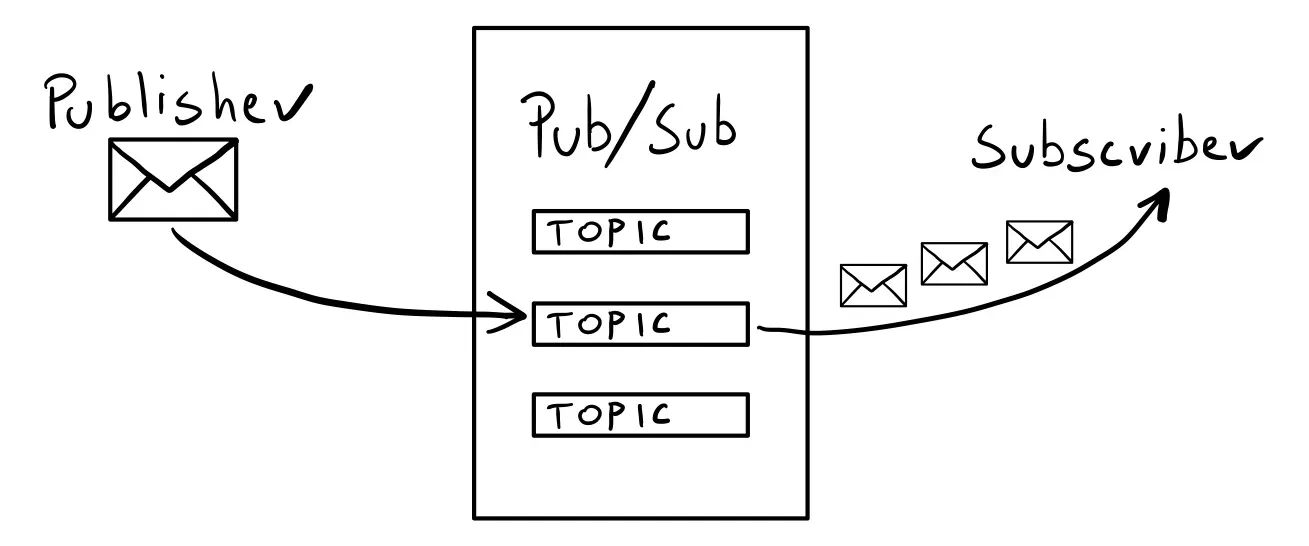
First, you need a **Pub/Sub** — a system that lets you work with messages across the network (also known as a “message broker” or a “queue”). Common picks are Kafka or RabbitMQ, but it could just as well be an SQL database.
|
||
|
||
Watermill abstracts away all Pub/Subs into two interfaces:
|
||
|
||
```
|
||
type Publisher interface {
|
||
Publish(topic string, messages ...*Message) error
|
||
Close() error
|
||
}
|
||
|
||
type Subscriber interface {
|
||
Subscribe(ctx context.Context, topic string) (<-chan *Message, error)
|
||
Close() error
|
||
}
|
||
```
|
||
|
||
You can `Publish` messages and `Subscribe` to them. There’s always a `topic` involved — a string that decides who gets the message.
|
||
|
||
Here’s basic Watermill architecture in one picture:
|
||
|
||
|
||
|
||
The core part of Watermill is the `Message`. It is what the `Request` is for the `net/http` package. The simplest message has just an optional ID and a payload. The payload is a slice of bytes, so you can use any marshaling you want (JSON, Protocol Buffers, plain strings, etc.).
|
||
|
||
```
|
||
msg := message.NewMessage(watermill.NewUUID(), []byte("Hello, world!"))
|
||
```
|
||
|
||
While all Watermill’s components are based on the `Publisher` and `Subscriber` interfaces, using them directly is a relatively low-level API. In this example, we’ll use the CQRS component of Watermill, which is a higher-level API. It’s based on the same ideas but removes some boilerplate, like serialization and deserialization. We’ll use the `EventBus` to publish events and `EventProcessor` to subscribe to them.
|
||
|
||
## High-level architecture overview
|
||
|
||

|
||
|
||
We want to publish two events:
|
||
|
||
- `PostViewed` is published when someone sees the post.
|
||
- `PostReactionAdded` is published when someone reacts to a post.
|
||
|
||
Each will have an event handler that updates the post’s stats in the database. (A similar concept as an HTTP handler.) The handlers should also publish the `PostStatsUpdated` event. We will use it to trigger the SSE updates.
|
||
|
||
## Publishing events
|
||
|
||
First, let’s create a publisher. I use Google Cloud Pub/Sub Publisher, but it can be swapped with any other publisher supported by Watermill. All the configuration needs is a project ID.
|
||
|
||
*(Note that Google Cloud Pub/Sub is just one the Pub/Subs Watermill supports. You could easily change this to [another supported Pub/Sub](https://watermill.io/pubsubs/). Kind of like an ORM would work with MySQL, PostgreSQL, and SQLite.)*
|
||
|
||
```
|
||
logger := watermill.NewStdLogger(false, false)
|
||
|
||
publisher, err := googlecloud.NewPublisher(
|
||
googlecloud.PublisherConfig{
|
||
ProjectID: cfg.PubSubProjectID,
|
||
},
|
||
logger,
|
||
)
|
||
```
|
||
|
||
Publisher works with messages, meaning you must marshal events (structs) into bytes and choose what topics to publish them to. It’s very common to use the same marshaling for all events and topics that follow some convention, like the event name being part of them.
|
||
|
||
We will use the `EventBus` component to simplify the publishing API. You can think of it as a high-level wrapper on the publisher (as you can see, it’s the first argument). You pass the configuration options once and then can publish events with a single method call.
|
||
|
||
```
|
||
eventBus, err := cqrs.NewEventBusWithConfig(
|
||
publisher,
|
||
cqrs.EventBusConfig{
|
||
GeneratePublishTopic: func(params cqrs.GenerateEventPublishTopicParams) (string, error) {
|
||
return params.EventName, nil
|
||
},
|
||
Marshaler: cqrs.JSONMarshaler{},
|
||
Logger: logger,
|
||
},
|
||
)
|
||
```
|
||
|
||
The configuration takes a `Marshaler`, so we use the `cqrs.JSONMarshaler{}` (all messages will be marshaled to JSON).
|
||
|
||
The `GeneratePublishTopic` function returns the topic’s name based on the available parameters. Instead of passing a topic directly to `Publish,` we define this function to determine the topic based on the message. The `EventBus` calls this function every time a message is published. In this case, we’ll use the `params.EventName`. So, if you consider a struct like this:
|
||
|
||
```
|
||
type PostViewed struct {
|
||
PostID int `json:"post_id"`
|
||
}
|
||
```
|
||
|
||
It will be published on the `PostViewed` topic. (The chosen marshaler provides a way to extract the event name).
|
||
|
||
Publishing events using the event bus is trivial. Thanks to the setup of marshaler and `GeneratePublishTopic`, we pass the event struct to `Publish`, and the rest happens behind the scenes. In the HTTP handler, we can use something like this:
|
||
|
||
```
|
||
event := PostViewed{
|
||
PostID: post.ID,
|
||
}
|
||
|
||
err = h.eventBus.Publish(ctx, event)
|
||
```
|
||
|
||
## Subscribing to events
|
||
|
||
I decided to make the HTTP endpoints just publish the events. The event handlers update the post’s stats in the database asynchronously. This way, the client doesn’t need to wait for the changes to be applied, and the view will be eventually updated via SSE.
|
||
|
||
We need two event handlers to update the stats in the database. The first updates the views count, and the second updates the reactions count.
|
||
|
||
The CQRS component used for subscribing to events is the `EventProcessor`. As with the `EventBus`, some setup needs to be done initially. But thanks to this, writing the handlers later will be very pleasant. The idea behind it is similar to the `EventBus`, but it’s the other way around.
|
||
|
||
First, create a Router. It’s a similar concept to the HTTP routers you’re familiar with. The component runs in the background and routes messages to handlers.
|
||
|
||
```
|
||
router, err := message.NewRouter(message.RouterConfig{}, logger)
|
||
```
|
||
|
||
Similarly to HTTP routers, Watermill’s router supports middlewares. For example, you can add the `Recoverer` middleware so panics in handlers don’t blow up your server.
|
||
|
||
```
|
||
router.AddMiddleware(middleware.Recoverer)
|
||
```
|
||
|
||
Now we can create the EventProcessor.
|
||
|
||
```
|
||
eventProcessor, err := cqrs.NewEventProcessorWithConfig(
|
||
router,
|
||
cqrs.EventProcessorConfig{
|
||
GenerateSubscribeTopic: func(params cqrs.EventProcessorGenerateSubscribeTopicParams) (string, error) {
|
||
return params.EventName, nil
|
||
},
|
||
SubscriberConstructor: func(params cqrs.EventProcessorSubscriberConstructorParams) (message.Subscriber, error) {
|
||
return googlecloud.NewSubscriber(
|
||
googlecloud.SubscriberConfig{
|
||
ProjectID: cfg.PubSubProjectID,
|
||
GenerateSubscriptionName: func(topic string) string {
|
||
return fmt.Sprintf("%v_%v", topic, params.HandlerName)
|
||
},
|
||
},
|
||
logger,
|
||
)
|
||
},
|
||
Marshaler: cqrs.JSONMarshaler{},
|
||
Logger: logger,
|
||
},
|
||
)
|
||
```
|
||
|
||
The first argument is the router. It’s similar to how the `EventBus` “wrapped” the publisher.
|
||
|
||
Then comes the config. The `Marshaler` and `GenerateSubscribeTopic` are the same concepts as in the `EventBus`. The only difference is they come at the other end of the Pub/Sub. In the `EventBus`, the marshaler marshals the message, and the function decides to which topic to publish it. Here, the `Marshaler` unmarshals the message back on the struct, and `GenerateSubscribeTopic` decides to which topic to subscribe to.
|
||
|
||
`SubscriberConstructor` is what the name says: it returns a new `Subscriber`. You may wonder, why not use a single subscriber, as we did with the `publisher` in the `EventBus`?
|
||
|
||
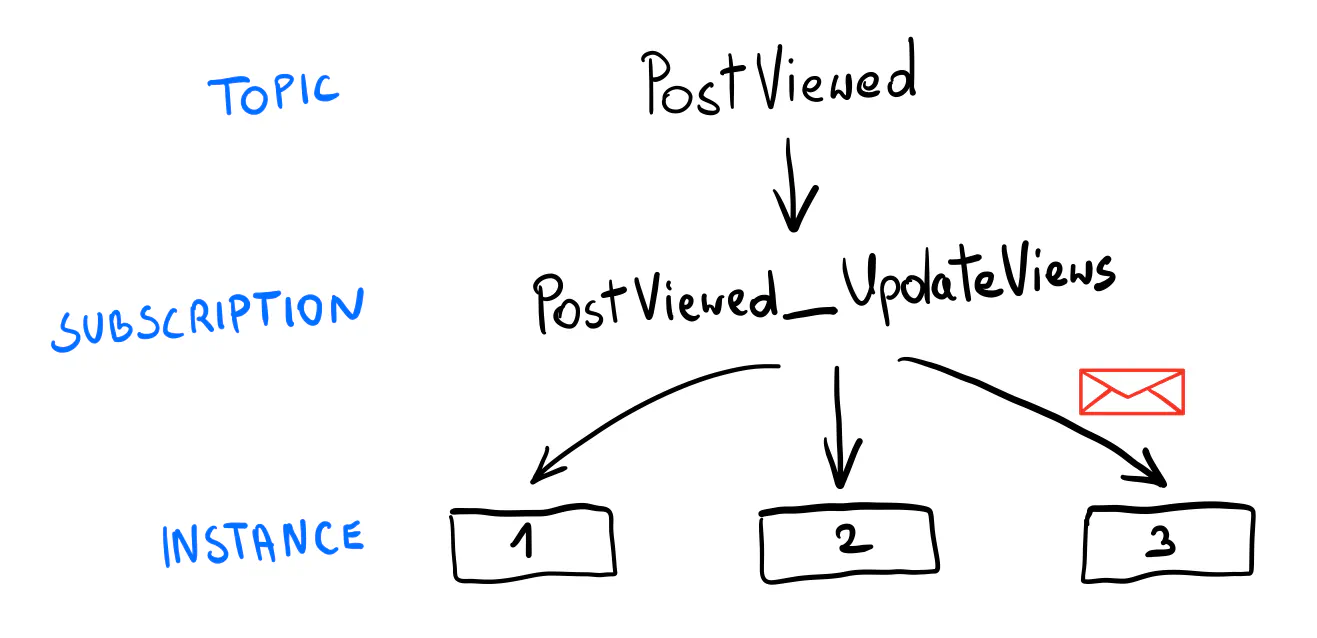
Publishing messages is straightforward: you marshal a struct, send the bytes to a topic, and you’re done. Subscribing is where things get more interesting. For example, you run two replicas of the same service. How do you ensure that only one replica receives a message from the Pub/Sub?
|
||
|
||
The strategy depends on the Pub/Sub. In Google Cloud Pub/Sub, you use a single “subscription” bound to a topic and share it among the replicas. That’s why having a subscriber constructor is helpful in this context. It allows us to specify what subscription to use for each event type. In this example, the subscription joins the topic name with the handler name. For example, `PostViewed_UpdateViews`.
|
||
|
||
|
||
|
||
As promised, with the setup done, adding message handlers is quite simple. Note that the functions are generic (with inferred types), so you work with strongly typed events! The handler name is used to generate the subscription name, so it needs to be unique within handlers.
|
||
|
||
```
|
||
err = eventProcessor.AddHandlers(
|
||
cqrs.NewEventHandler(
|
||
"UpdateViews",
|
||
func(ctx context.Context, event *PostViewed) error {
|
||
return repo.UpdatePost(ctx, event.PostID, func(post *Post) {
|
||
post.Views++
|
||
})
|
||
},
|
||
),
|
||
cqrs.NewEventHandler(
|
||
"UpdateReactions",
|
||
func(ctx context.Context, event *PostReactionAdded) error {
|
||
return repo.UpdatePost(ctx, event.PostID, func(post *Post) {
|
||
post.Reactions[event.ReactionID]++
|
||
})
|
||
},
|
||
),
|
||
)
|
||
```
|
||
|
||
### Be careful when refactoring
|
||
|
||
The names used for creating the topics and subscriptions are essential. If they were accidentally changed, you could lose messages.
|
||
|
||
You should not change the event or handler names once they’re running in production. If you need to, consider creating a new event or handler. For example, `PostViewedV2`.
|
||
|
||
The last part is running the router, just like you would run an HTTP server.
|
||
|
||
```
|
||
go func() {
|
||
err := router.Run(context.Background())
|
||
if err != nil {
|
||
panic(err)
|
||
}
|
||
}()
|
||
```
|
||
|
||
### Publishing PostStatsUpdated
|
||
|
||
We’ll use one more event to trigger the SSE updates: `PostStatsUpdated`. It includes the post’s ID and a record of what has been updated (views or the reaction ID).
|
||
|
||
```
|
||
type PostStatsUpdated struct {
|
||
PostID int `json:"post_id"`
|
||
ViewsUpdated bool `json:"views_updated"`
|
||
ReactionUpdated *string `json:"reaction_updated"`
|
||
}
|
||
```
|
||
|
||
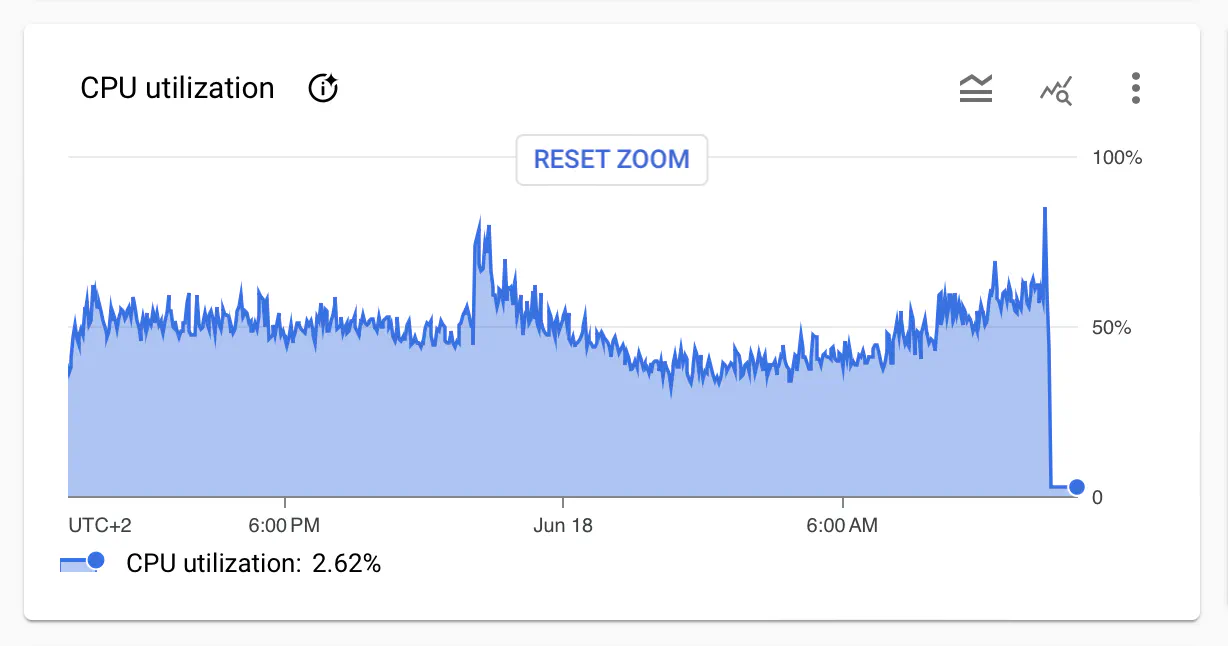
Since the release of this post, I realized the naive approach of getting the post from the database on each update doesn’t scale well (hundreds of `SELECT` queries on each update, depending on how many visitors we have). I’ve updated the example so the `PostStatsUpdated` event includes all stats. This way, the SSE endpoint doesn’t need to query the database at all, except for the initial call. You can see how big was the impact on the database load.
|
||
|
||
|
||
|
||
I left the original version in the code snippets for simplicity. You can see the changes on [GitHub](https://github.com/ThreeDotsLabs/watermill/commit/0ea2d2de47d9c83ef85791a17822cc058ea54de2).
|
||
|
||
After updating the post, both handlers should publish the `PostStatsUpdated` event.
|
||
|
||
```
|
||
err = eventProcessor.AddHandlers(
|
||
cqrs.NewEventHandler(
|
||
"UpdateViews",
|
||
func(ctx context.Context, event *PostViewed) error {
|
||
err = repo.UpdatePost(ctx, event.PostID, func(post *Post) {
|
||
post.Views++
|
||
})
|
||
if err != nil {
|
||
return err
|
||
}
|
||
|
||
statsUpdated := PostStatsUpdated{
|
||
PostID: event.PostID,
|
||
ViewsUpdated: true,
|
||
}
|
||
|
||
return eventBus.Publish(ctx, statsUpdated)
|
||
},
|
||
),
|
||
cqrs.NewEventHandler(
|
||
"UpdateReactions",
|
||
func(ctx context.Context, event *PostReactionAdded) error {
|
||
err := repo.UpdatePost(ctx, event.PostID, func(post *Post) {
|
||
post.Reactions[event.ReactionID]++
|
||
})
|
||
if err != nil {
|
||
return err
|
||
}
|
||
|
||
statsUpdated := PostStatsUpdated{
|
||
PostID: event.PostID,
|
||
ReactionUpdated: &event.ReactionID,
|
||
}
|
||
|
||
return eventBus.Publish(ctx, statsUpdated)
|
||
},
|
||
),
|
||
)
|
||
```
|
||
|
||
## SSE Router
|
||
|
||
It’s time to implement the SSE endpoints. Watermill also provides an SSE component that works well with other internals.
|
||
|
||
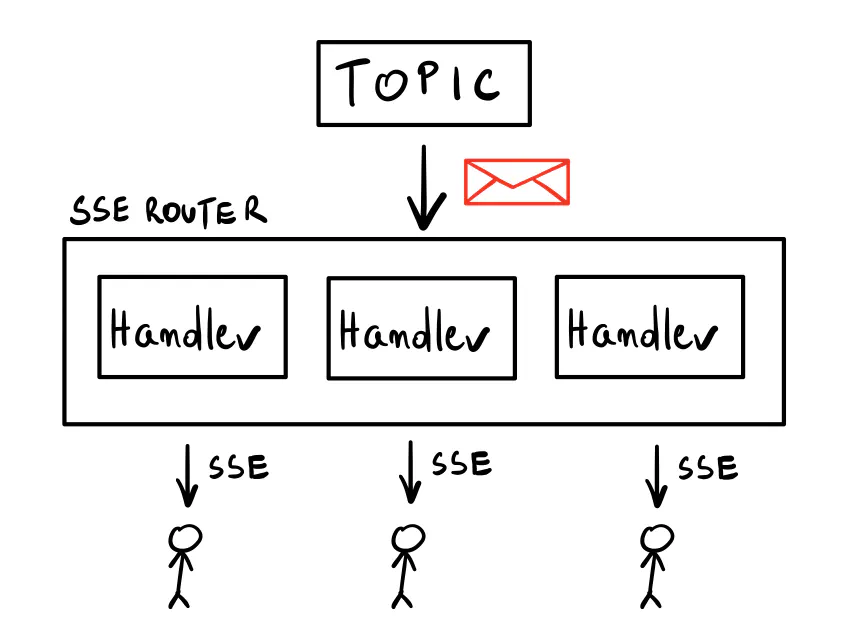
The main component is called SSE Router, and the idea behind it is pretty simple. When you call its `AddHandler` method, it subscribes to the given topic in the configured subscriber. The method returns a regular HTTP handler you can use with any HTTP router you want. Whenever a message appears in the chosen topic, it will be propagated in a fan-out fashion to all running SSE endpoints within.
|
||
|
||
|
||
|
||
First, let’s create the `SSERouter` (it comes from the [watermill-http](https://github.com/ThreeDotsLabs/watermill-http) package — use the `v2` version!).
|
||
|
||
The config requires an `UpstreamSubscriber`: you need to subscribe to a Pub/Sub that contains the events. We use Google Cloud Pub/Sub again. I’ll explain the details of the configuration a bit later.
|
||
|
||
We use a string marshaler as we’re going to return plain HTML.
|
||
|
||
```
|
||
subscriber, err := googlecloud.NewSubscriber(googlecloud.SubscriberConfig{
|
||
// ...
|
||
}, logger)
|
||
if err != nil {
|
||
panic(err)
|
||
}
|
||
|
||
sseRouter, err := http.NewSSERouter(http.SSERouterConfig{
|
||
UpstreamSubscriber: subscriber,
|
||
Marshaler: http.StringSSEMarshaler{},
|
||
}, logger)
|
||
if err != nil {
|
||
panic(err)
|
||
}
|
||
```
|
||
|
||
Then, you need to implement the `StreamAdapter` interface:
|
||
|
||
```
|
||
type StreamAdapter interface {
|
||
InitialStreamResponse(w http.ResponseWriter, r *http.Request) (response interface{}, ok bool)
|
||
NextStreamResponse(r *http.Request, msg *message.Message) (response interface{}, ok bool)
|
||
}
|
||
```
|
||
|
||
These two methods are very similar. The first one is how you respond to the initial HTTP request. If needed, it lets you return an error and write it to the `ResponseWriter`. This is important because as soon as you write any data, it’s too late to change the response code or the headers. So, `InitialStreamResponse` is where you handle things like validation or authentication. If any errors happen, return `ok` equal `false` to stop the handler. Otherwise, what you return becomes the first event sent to the client.
|
||
|
||
`NextStreamResponse` is called for each incoming `Message`. You can return a `response` to be sent to the SSE clients that use this endpoint. Or you can skip the message (again, return `ok` equal `false`).
|
||
|
||
By default, whatever you return as the `response` is marshaled to JSON with event type `data`. You can override this with a custom marshaler, as we did here. You can also return the `ServerSentEvent` struct, which lets you explicitly specify the `Event` and `Data` fields.
|
||
|
||
In our case, `InitialStreamResponse` simply returns the post’s response.
|
||
|
||
```
|
||
func (s *statsStream) InitialStreamResponse(w http.ResponseWriter, r *http.Request) (response interface{}, ok bool) {
|
||
postIDStr := r.PathValue("id")
|
||
postID, err := strconv.Atoi(postIDStr)
|
||
if err != nil {
|
||
w.WriteHeader(http.StatusBadRequest)
|
||
w.Write([]byte("invalid post ID"))
|
||
return nil, false
|
||
}
|
||
|
||
resp, err := s.getResponse(r.Context(), postID, nil)
|
||
if err != nil {
|
||
w.WriteHeader(http.StatusInternalServerError)
|
||
w.Write([]byte(err.Error()))
|
||
return nil, false
|
||
}
|
||
|
||
return resp, true
|
||
}
|
||
```
|
||
|
||
`NextStreamResponse` is similar, but it also checks if the post’s ID in the event matches the one in the URL. If not, it skips the message. It means a post has been updated, but not the one this endpoint returns.
|
||
|
||
```
|
||
func (s *statsStream) NextStreamResponse(r *http.Request, msg *message.Message) (response interface{}, ok bool) {
|
||
postIDStr := r.PathValue("id")
|
||
postID, err := strconv.Atoi(postIDStr)
|
||
if err != nil {
|
||
fmt.Println("invalid post ID")
|
||
return nil, false
|
||
}
|
||
|
||
var event PostStatsUpdated
|
||
err = json.Unmarshal(msg.Payload, &event)
|
||
if err != nil {
|
||
fmt.Println("cannot unmarshal: " + err.Error())
|
||
return "", false
|
||
}
|
||
|
||
if event.PostID != postID {
|
||
return "", false
|
||
}
|
||
|
||
resp, err := s.getResponse(r.Context(), postID, &event)
|
||
if err != nil {
|
||
fmt.Println("could not get response: " + err.Error())
|
||
return nil, false
|
||
}
|
||
|
||
return resp, true
|
||
}
|
||
```
|
||
|
||
As you can see, there’s no usual error handling here. The best we can do is log the error and return `false` to skip the message. The handler already replied with `200 OK`, so it’s too late to change the status code. Alternatively, we could return a custom response with the error message to be displayed to the user.
|
||
|
||
With the stream adapter ready, we can create a handler on the SSE Router:
|
||
|
||
```
|
||
statsHandler := sseRouter.AddHandler("PostStatsUpdated", &statsStream{repo: repo})
|
||
```
|
||
|
||
The first argument here is the `topic` to listen to. The returned value is a ready-to-use `http.HandlerFunc`.
|
||
|
||
Most HTTP libraries and frameworks are compatible with `net/http`, so you can use it with whatever HTTP router you like. I use echo, so there’s a small conversion of the path value needed:
|
||
|
||
```
|
||
e.GET("/posts/:id/stats", func(c echo.Context) error {
|
||
postID := c.Param("id")
|
||
c.Request().SetPathValue("id", postID)
|
||
|
||
statsHandler(c.Response(), c.Request())
|
||
return nil
|
||
})
|
||
```
|
||
|
||
Finally, you need to run the SSE router in a separate goroutine:
|
||
|
||
```
|
||
go func() {
|
||
err := sseRouter.Run(context.Background())
|
||
if err != nil {
|
||
panic(err)
|
||
}
|
||
}()
|
||
```
|
||
|
||
And that’s it! Whenever a message is published on the `PostStatsUpdated` topic, the SSE Router propagates it to all clients listening to the `GET /posts/:id/stats` endpoint.
|
||
|
||
The handlers created by the SSE Router already handle all implementation details, so you don’t need to worry about setting the headers.
|
||
|
||
When called without an `Accept` header or with a value other than `text/event-stream`, the handlers act as regular GET handlers, returning the response from `InitialStreamResponse`. Creating an `EventStream` in JavaScript automatically passes the header for you, but keep this in mind when debugging your endpoints with a tool like `curl`!
|
||
|
||
```
|
||
# Regular HTTP response
|
||
curl localhost:8080/posts/1/stats
|
||
|
||
# SSE response
|
||
curl -H "Accept: text/event-stream" localhost:8080/posts/1/stats
|
||
```
|
||
|
||
### Configuring the Subscriber
|
||
|
||
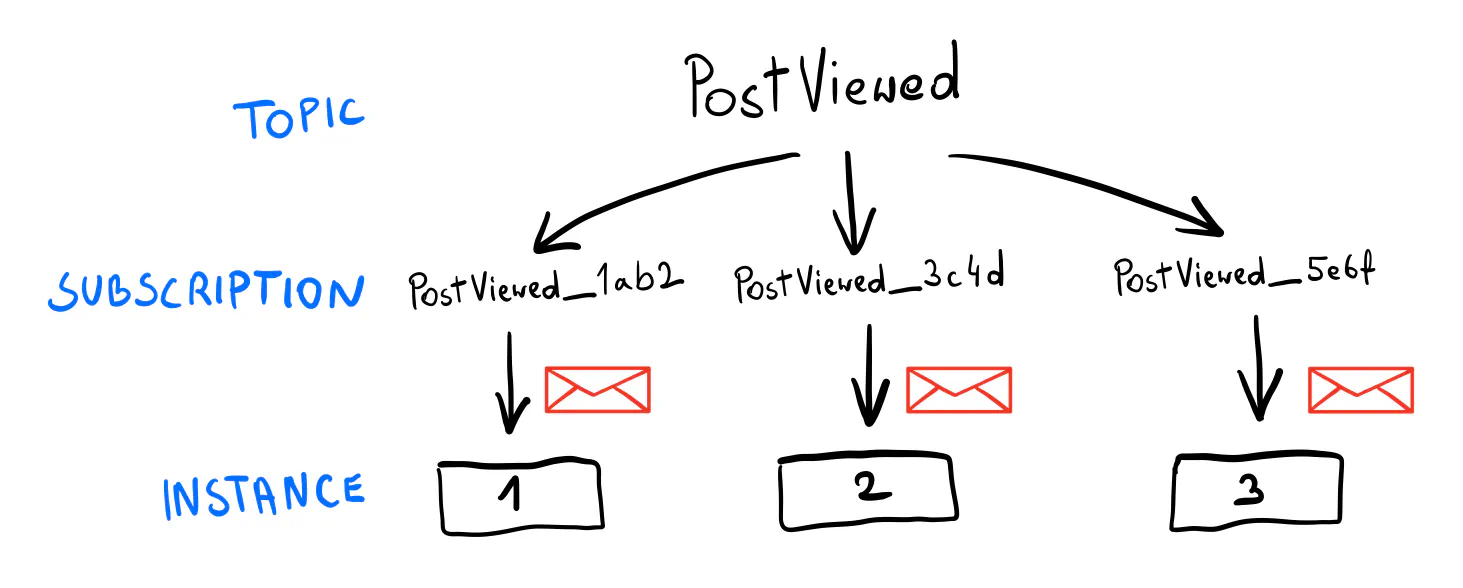
Remember the part that we want each event to be processed only by one service replica at a time? In the case of events used for SSE, you need a counterintuitive approach: all subscribers need to process each event, as the SSE endpoints will be running across all of your service instances.
|
||
|
||
|
||
|
||
In other words, in this case, each replica should have its own subscription that’s not shared with anyone. For Google Cloud Pub/Sub, an easy way to do it is to generate a unique subscription name on the service’s startup. For example, using a “short UUID” would generate subscription names like `PostStatsUpdated_lkcNowPZ99M123xPwqcxp1`.
|
||
|
||
Keep in mind this can have some impact on your Pub/Sub. For example, when using Google Cloud Pub/Sub, it’s best to set the expiration policy for such subscriptions for one day, so they’re deleted when no longer used. There’s a hard limit of 10,000 subscriptions; you could quickly hit it this way.
|
||
|
||
```
|
||
subscriber, err := googlecloud.NewSubscriber(
|
||
googlecloud.SubscriberConfig{
|
||
ProjectID: cfg.PubSubProjectID,
|
||
GenerateSubscriptionName: func(topic string) string {
|
||
return fmt.Sprintf("%v_%v", topic, watermill.NewShortUUID())
|
||
},
|
||
SubscriptionConfig: pubsub.SubscriptionConfig{
|
||
ExpirationPolicy: time.Hour * 24,
|
||
},
|
||
},
|
||
logger,
|
||
)
|
||
```
|
||
|
||
If that sounds like a lot to consider, it’s because there is! Running production-grade Event-Driven systems comes with many advantages, but it’s not trivial. That’s why I go into detail here, so you know what to expect in production, not just in toy examples. (If that sounds like something you’d like to learn in-depth, see our [Go Event-Driven training](https://threedots.tech/event-driven/).)
|
||
|
||
## htmx
|
||
|
||
The last piece of the puzzle is the client-side code.
|
||
|
||
In the example, we use htmx, a library that lets you make AJAX requests with HTML attributes. It also supports SSE with an extension. The templating in the snippets below comes from templ.
|
||
|
||
```
|
||
<div hx-ext="sse" sse-connect={ "/posts/" + post.ID + "/stats" } sse-swap="data"></div>
|
||
```
|
||
|
||
The `sse-swap` attribute is the event type to look for from the stream. By default, Watermill’s SSE endpoints use `data`, so that’s what we use. Every time an event is received from the `/posts/:id/stats` endpoint, its payload will be injected inside the div. (Remember, our events are HTML.)
|
||
|
||
We also use htmx to send the reaction form asynchronously (a classic POST AJAX request). In this case, we use `hx-swap="outerHTML"`, which replaces the entire form with the response from the server. It’s a button with a ✅ “check” suggesting that the reaction has been added. The SSE will eventually update the stats. (Although there might be a slight delay. If you care about UX, returning a “fake” number increase could make sense here.)
|
||
|
||
```
|
||
<form hx-post={ "/posts/" + postID + "/reactions"} hx-swap="outerHTML">
|
||
<input type="hidden" name="reaction_id" value={ reaction.ID } />
|
||
<button type="submit" class={"btn", "btn-outline-secondary", "m-1", templ.KV("animated", reaction.JustChanged)}>
|
||
<span class="emoji">{ reaction.Label }</span>
|
||
<span class="counter">{ reaction.Count }</span>
|
||
</button>
|
||
</form>
|
||
```
|
||
|
||
### Animations
|
||
|
||
If you’re used to working with Single Page Applications, using htmx might initially feel weird. For example, consider animating an element that has just been updated. In a classic SPA, you would get the JSON response from the SSE endpoint, compare the values with what’s in the “model”, and decide whether to animate the element.
|
||
|
||
While htmx allows for “hooks” after the request is done, it’s probably not what you want. Instead, you need to adjust your mental model a bit. The server code is the source of truth in this setup. There is no “client” that decides how to display things.
|
||
|
||
In this example, I use a CSS class to mark the updated element. The class includes an animation that pops up the element for a moment. The server code decides whether to add the class or not (based on the data in the incoming event). (`templ.KV` is how you add a class conditionally using templ. It will be present if `stats.Views.JustChanged` is true.)
|
||
|
||
```
|
||
<div class={ "d-flex", "align-items-center", templ.KV("animated", stats.Views.JustChanged)}>
|
||
<span class="me-1">👁️</span>
|
||
<small class="text-muted">{ stats.Views.Count + " views" }</small>
|
||
</div>
|
||
```
|
||
|
||
## Other things to consider
|
||
|
||
### Two kinds of SSE endpoints
|
||
|
||
How you return events from SSE endpoints is totally up to you. Here are two ways that make sense in different scenarios.
|
||
|
||
1. An endpoint that returns the same data model initially and on every update. With each triggered update, you kind of “refresh” the model, perhaps embedded on the website. This is what we use in the example above.
|
||
2. An endpoint that returns nothing initially and then keeps sending unique updates as they happen. You can append each new event to some list, for example. It’s how you would implement notifications or a web chat.
|
||
|
||
### At-least-once delivery
|
||
|
||
When working with virtually any Pub/Sub, you must be aware of the “at-least-once” delivery guarantee. You may receive the same message twice because of network issues or your server going down at the wrong moment.
|
||
|
||
Don’t try to work around this. Instead, embrace that this can happen and design your handlers to be *idempotent*. It means that processing the message twice (or more) has the same effect as processing it once.
|
||
|
||
In the example above, we don’t guard against it. If the same message was processed twice, it would add an extra view or reaction in the database. It’s not a big deal in this case, and we can live with it. One way to prevent it would be to store the processed message IDs in the database and check it on each update.
|
||
|
||
### Watch out for HTTP/1.1
|
||
|
||
In modern browsers, there’s a limit of 6 open connections per server over HTTP/1.1, which can be a big issue when using SSE. Your website won’t work well if someone opens it in several tabs.
|
||
|
||
For best results, use SSE with HTTP/2 where this limit doesn’t apply. Most modern web servers support HTTP/2, so make sure you enable it.
|
||
|
||
## Local environment tricks
|
||
|
||
Here are two tips unrelated to SSE that might be useful for running your app locally.
|
||
|
||
### Mounting /go/pkg and go cache
|
||
|
||
In the docker-compose definition, you can mount the `/go/pkg` and `/go-cache` directories to speed up the build process. This way, you don’t have to download the dependencies whenever you rebuild the container.
|
||
|
||
```
|
||
services:
|
||
server:
|
||
# ...
|
||
volumes:
|
||
- go_pkg:/go/pkg
|
||
- go_cache:/go-cache
|
||
|
||
volumes:
|
||
go_pkg:
|
||
go_cache:
|
||
```
|
||
|
||
### Reflex for regenerating templ and rebuilding the server
|
||
|
||
[Reflex](https://github.com/cespare/reflex) is my go-to tool for live code reloading. (See [my post on the dev environment setup](https://threedots.tech/post/go-docker-dev-environment-with-go-modules-and-live-code-reloading/).) When working with templ, you can use a configuration like the one below to regenerate the templates and rebuild the server after every change.
|
||
|
||
It’s a great way to speed up your development process, so you don’t need to keep switching between code, the terminal, and the browser.
|
||
|
||
```
|
||
-r '(\.go$|go\.mod$)' -s go run .
|
||
-r '\.templ$' templ generate
|
||
```
|
||
|
||
## Go build something!
|
||
|
||
That should be all the theory you need to build something cool. If you have any questions, let me know in the comments.
|
||
|
||
Once again, the complete source code is on [GitHub](https://github.com/ThreeDotsLabs/watermill/tree/master/_examples/real-world-examples/server-sent-events-htmx) You can run it locally with `docker-compose up`.
|
||
|
||
Give this stack a try; I had lots of fun working with it. Good luck! |