
18 KiB
page-title, url, date
| page-title | url | date |
|---|---|---|
| Building Your Own DevSecOps Knowledge Base with OpenAI, LangChain, and LlamaIndex | by Wenqi Glantz | May, 2023 | Better Programming | https://betterprogramming.pub/building-your-own-devsecops-knowledge-base-with-openai-langchain-and-llamaindex-b28cda15abb7 | 2023-06-02 12:38:49 |
Building Your Own DevSecOps Knowledge Base with OpenAI, LangChain, and LlamaIndex
Building your custom knowledge base chatbot
[

](https://medium.com/@wenqiglantz?source=post_page-----b28cda15abb7--------------------------------)[

](https://betterprogramming.pub/?source=post_page-----b28cda15abb7--------------------------------)
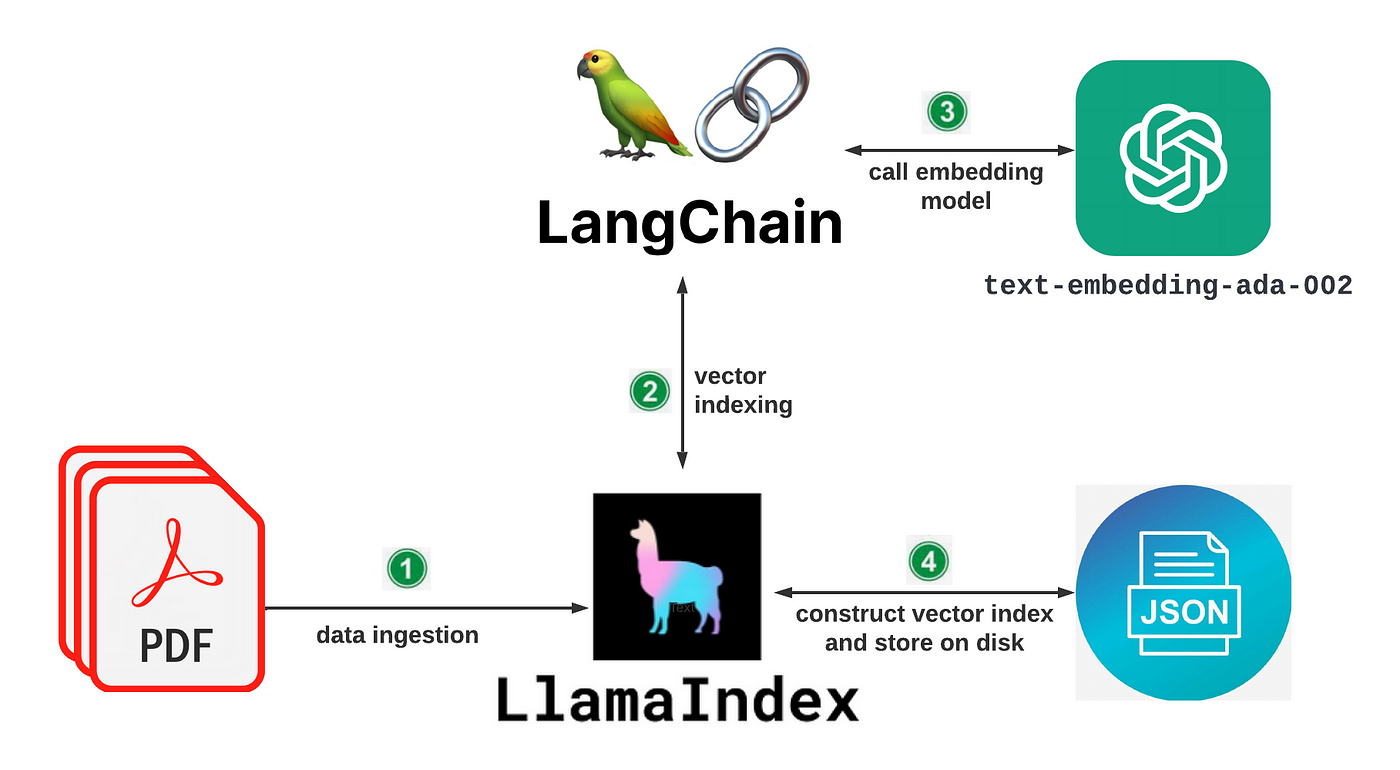
Diagram by author
DevSecOps is a big part of what I do daily at my current job. I love learning in the DevSecOps space and sharing my knowledge with others through blogging. Often, I find myself searching through my articles for the information I need. Wouldn’t it be nice to build my own custom knowledge base for DevSecOps so I can feed my files or articles to it and search it when needed?
In this article, let’s explore building a custom DevSecOps knowledge base using OpenAI, LangChain, and LlamaIndex (GPT Index).
High-Level Architecture
We are going first to feed my article files to our knowledge base. Then we query our knowledge base with questions from my article files related to DevSecOps.
Let’s split the architecture into two stages: data ingestion/indexing and data querying.
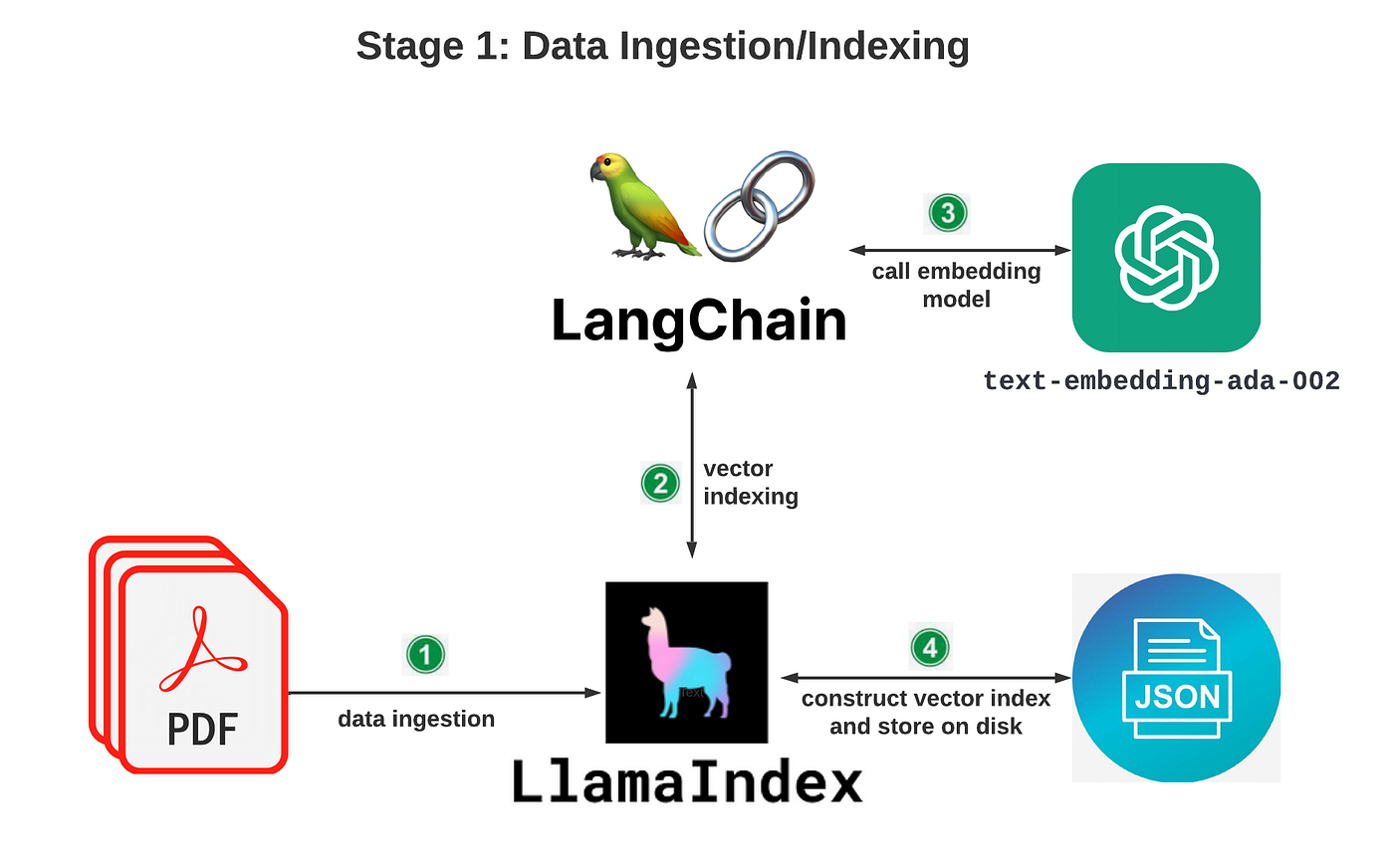
Diagram by author
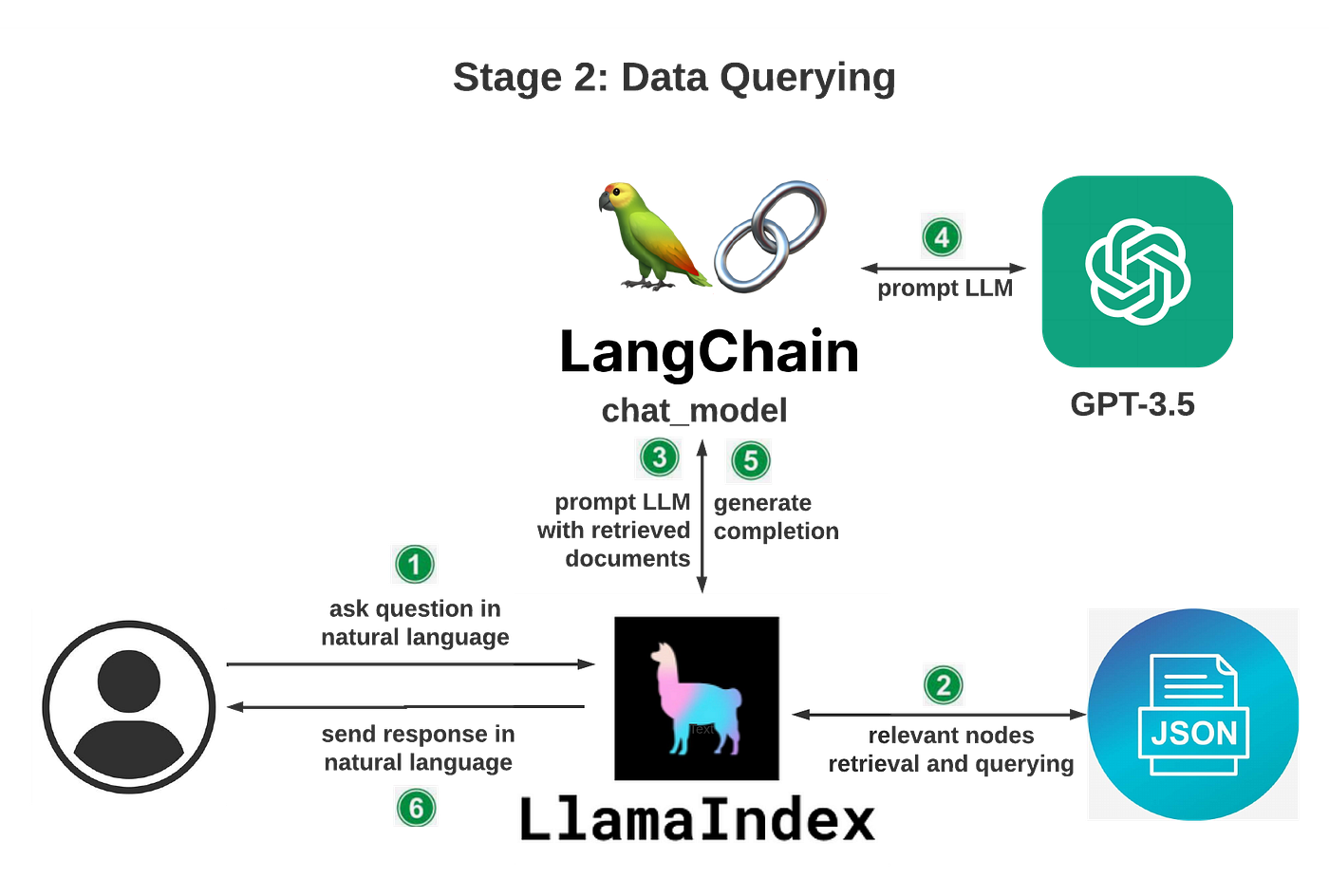
Diagram by author
Now, let’s get started building our knowledge base.
Prerequisites
- Python installation: assume you have Python installed in your local environment. If not, please refer to the Python download page to download and install Python. Be sure to upgrade pip to the latest version by running the following command:
python -m pip install -U pip
- OpenAI API key: navigate to OpenAI’s API Keys page to generate a new API key if you don’t already have one. Suggest you also set up a usage limit through their Usage Limits page so you can manage your spending.
- Create a directory on your local environment, for example
DevSecOpsKB. You will be running all commands below in this directory.
Installation of Libraries
To train our custom DevSecOps knowledge base, we need to install a few libraries. Simply navigate to the DevSecOpsKB directory, and run:
pip install openai langchain llama_index==0.6.12 pypdf PyCryptodome gradio
Note: we specified version 0.6.12 for llama_index. Without specifying the version, it would install the latest version, 0.6.16 as of this update (May 31 2023), which introduced breaking changes. We cover some of the changes in the latest llama_index release in another blog.
Let’s take a closer look at each library.
OpenAI library
We are using OpenAI library for two purposes:
- Data ingestion/indexing: as depicted in the architecture diagram above, we will be calling OpenAI’s embedding model
text-embedding-ada-002via LangChain under the hood. - Data query: we will call OpenAI’s GPT-3.5 LLM (Large Language Model). GPT-3.5 models can understand and generate natural language or code. We will be using their most capable and cost-effective model in the GPT-3.5 family,
gpt-3.5-turbo.
LangChain
LangChain is an open source library that provides developers with the necessary tools to create applications powered by LLMs. It is a framework built around LLMs that can be used for chatbots, Generative Question-Answering (GQA), summarization, and much more. The core idea of the library is that developers can “chain” together different components to create more advanced use cases around LLMs.
LangChain offers a series of modules, which are the core abstractions as the building blocks of any LLM-powered application. These modules include models, prompts, memory, indexes, chains, agents, and callbacks. For our knowledge base chatbot, we will be using LangChain’s chat_models module.
LlamaIndex
LlamaIndex uses LangChain’s LLM modules and allows for customizing the underlying LLM. LlamaIndex is a powerful tool that provides a central interface to connect the LLM with external data and allows you to create a chatbot based on the data you feed it. With LlamaIndex, you don’t need to be an NLP or machine learning expert. You only need to provide the data you want the chatbot to use, and LlamaIndex will take care of the rest.
As outlined by Jerry Liu, the creator of LlamaIndex, LlamaIndex provides the following tools in an easy-to-use fashion:
- Offers data connectors to ingest your existing data sources and data formats (APIs, PDFs, docs, SQL, etc.)
- Provides ways to structure your data (indices, graphs) so that this data can be easily used with LLMs.
- Provides an advanced retrieval/query interface over your data: Feed in any LLM input prompt, get back retrieved context and knowledge-augmented output.
- Allows easy integrations with your outer application framework (e.g., LangChain, Flask, Docker, ChatGPT, or anything else).
pypdf + PyCryptodome
pypdf is a free and open source pure-python PDF library capable of splitting, merging, cropping, and transforming the pages of PDF files. We will be using this library to parse our PDF files. PyCryptodome is another library that helps prevent errors while parsing PDF files.
Gradio
Gradio is an open source Python package that allows you to quickly create easy-to-use, customizable UI components for your ML model, any API, or even an arbitrary Python function using a few lines of code. You can integrate the Gradio GUI directly into your Jupyter Notebook or share it as a link with anyone. Let’s use Gradio to build a simple UI for our knowledge base.
How to Add Data Source
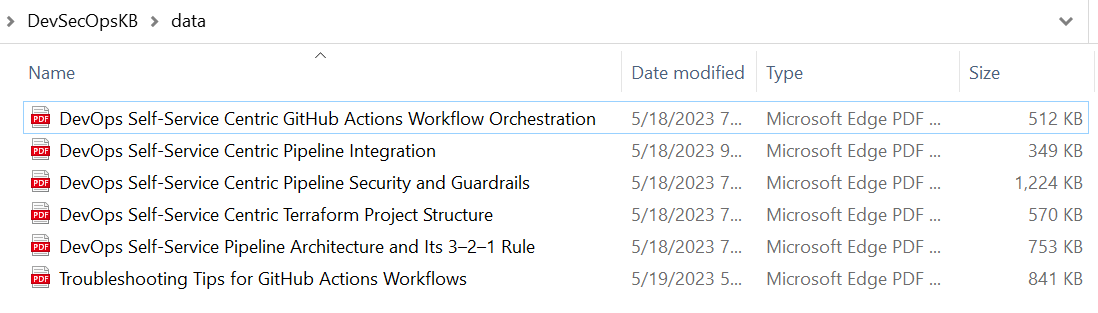
I converted my articles listed in The Path to DevOps Self-Service: A Five-Part Series, along with the Troubleshooting Tips for GitHub Actions Workflows, into PDFs and saved those PDF documents under my DevSecOpsKB/data directory. Let’s use these documents to start training our knowledge base chatbot.
Implement Python Code
There are many open source Python tutorials online for building custom chatbots, but many contain outdated code as they were built on older versions of the libraries, and hard to get them to work as desired. I recommend follow the instructions on the LlamaIndex Usage Pattern page as the base framework, then add your custom logic. Let’s dive into the code.
Step 1: Import the following modules and classes:
from llama_index import StorageContext, ServiceContext, GPTVectorStoreIndex, LLMPredictor, PromptHelper, SimpleDirectoryReader, load_index_from_storage
from langchain.chat_models import ChatOpenAI
import gradio as gr
import sys
import os
SimpleDirectoryReader,LLMPredictor,PromptHelper,StorageContext,ServiceContext,GPTVectorStoreIndex, andload_index_from_storageare classes from thellama_indexmodule.ChatOpenAIis a class from thelangchain.chat_modelsmodule.gradiois the library we use for creating web interfaces.sysandosare standard Python modules for system-related operations.
Step 2: The API key for OpenAI is set as an environment variable using os.environ["OPENAI_API_KEY"]. You need to replace 'YOUR-OPENAI-API-KEY' with your actual OpenAI API key for it to work.
os.environ["OPENAI_API_KEY"] = 'YOUR-OPENAI-API-KEY'
Step 3: Define the function data_ingestion_indexing(directory_path). This function is responsible for ingesting the data and creating and saving the index used for data queries in our knowledge base.
def create_service_context():
max\_input\_size = 4096
num\_outputs = 512
max\_chunk\_overlap = 20
chunk\_size\_limit = 600


prompt\_helper = PromptHelper(max\_input\_size, num\_outputs, max\_chunk\_overlap, chunk\_size\_limit=chunk\_size\_limit)


llm\_predictor = LLMPredictor(llm=ChatOpenAI(temperature=0.5, model\_name="gpt-3.5-turbo", max\_tokens=num\_outputs))


service\_context = ServiceContext.from\_defaults(llm\_predictor=llm\_predictor, prompt\_helper=prompt\_helper)
return service\_context
def data_ingestion_indexing(directory_path):
documents = SimpleDirectoryReader(directory\_path).load\_data()


index = GPTVectorStoreIndex.from\_documents(
    documents, service\_context=create\_service\_context()
)


index.storage\_context.persist()

return index
- We define a utility function named
create_service_context, which creates theServiceContext, a utility container for LlamaIndex index and query classes. The container contains objects that are commonly used for configuring every index and query, such as theLLMPredictor(for configuring the LLM, it is a wrapper class around LangChain’s LLMChain that allows easy integration into LlamaIndex), thePromptHelper(allows the user to explicitly set certain constraint parameters, such as maximum input size, number of generated output tokens, maximum chunk overlap, etc.), theBaseEmbedding(for configuring the embedding model), and more. - It uses
SimpleDirectoryReaderto load data from the specified directory path. - It creates an instance of
GPTVectorStoreIndexwith the loadeddocuments, and theservice_contextby calling the utility functioncreate_service_context(). - Finally, it calls the
storage_contextand persists the index to disk under the defaultstoragefolder, and returns theindexobject.
Step 4: Define the function data_querying(input_text). This function is the core of our knowledge base logic.
def data_querying(input_text):
storage\_context = StorageContext.from\_defaults(persist\_dir="./storage")


index = load\_index\_from\_storage(storage\_context, service\_context=create\_service\_context())


response = index.as\_query\_engine().query(input\_text)

    return response.response
- It rebuilds storage context.
- It loads the index from storage. Since we initialized the index with a custom
ServiceContextobject, we also need to pass in the sameServiceContextduringload_index_from_storage. - It queries the index with the input text using
index.as_query_engine().query(). - It returns the response received from the index.
Step 5: Define the UI by creating an instance of gr.Interface.
iface = gr.Interface(fn=data_querying,
inputs=gr.components.Textbox(lines=7, label="Enter your text"),
outputs="text",
title="Wenqi's Custom-trained DevSecOps Knowledge Base")
- The
fnparameter is set to thedata_queryingfunction defined earlier. - The
inputsparameter specifies a textbox input component with 7 lines for entering text. - The
outputsparameter specifies that the output will be text-based. - The
titleparameter sets the title of the web interface. Customize it to whatever you want your UI title to be.
Step 6: The data_ingestion_indexing function is called with the argument data to create and save the index. Notice this data directory is where we store our PDF documents. If you want to name your directory differently, change it here accordingly.
index = data_ingestion_indexing("data")
Step 7: The iface.launch(share=False) line launches the UI, making the chatbot accessible through a web browser. You have the option of turning share to True, which allows Gradio to create a share link so you can share your knowledge base chatbot with others. For this POC, we are disabling this feature for simplicity reason.
iface.launch(share=False)
See the complete code below. Copy this code into a file named kb.py, and placed it at the root of our DevSecOpsKB directory.
from llama_index import SimpleDirectoryReader, LLMPredictor, PromptHelper, StorageContext, ServiceContext, GPTVectorStoreIndex, load_index_from_storage
from langchain.chat_models import ChatOpenAI
import gradio as gr
import sys
import os
os.environ["OPENAI_API_KEY"] = 'YOUR-OPENAI-API-KEY'
def create_service_context():
max\_input\_size = 4096
num\_outputs = 512
max\_chunk\_overlap = 20
chunk\_size\_limit = 600


prompt\_helper = PromptHelper(max\_input\_size, num\_outputs, max\_chunk\_overlap, chunk\_size\_limit=chunk\_size\_limit)


llm\_predictor = LLMPredictor(llm=ChatOpenAI(temperature=0.5, model\_name="gpt-3.5-turbo", max\_tokens=num\_outputs))


service\_context = ServiceContext.from\_defaults(llm\_predictor=llm\_predictor, prompt\_helper=prompt\_helper)
return service\_context
def data_ingestion_indexing(directory_path):
documents = SimpleDirectoryReader(directory\_path).load\_data()


index = GPTVectorStoreIndex.from\_documents(
    documents, service\_context=create\_service\_context()
)


index.storage\_context.persist()

return index
def data_querying(input_text):
storage\_context = StorageContext.from\_defaults(persist\_dir="./storage")


index = load\_index\_from\_storage(storage\_context, service\_context=create\_service\_context())


response = index.as\_query\_engine().query(input\_text)

    return response.response
iface = gr.Interface(fn=data_querying,
inputs=gr.components.Textbox(lines=7, label="Enter your question"),
outputs="text",
title="Wenqi's Custom-trained DevSecOps Knowledge Base")
index = data_ingestion_indexing("data")
iface.launch(share=False)
Launch DevSecOps Knowledge Base
Now that we have our custom PDF files ready, and the code is ready, let’s launch our DevSecOps knowledge base by running the following command in the DevSecOpsKB directory:
python kb.py
Let’s launch the UI of our new knowledge base: http://127.0.0.1:7860/.
Here we go! Our new knowledge base is ready for us to tap into. Let’s ask a generic question on a term I coined in one of my articles on DevOps self-service model, in particular, the 3–2–1 rule, and I was happy to see that our new knowledge base outputs the right information I was looking for:

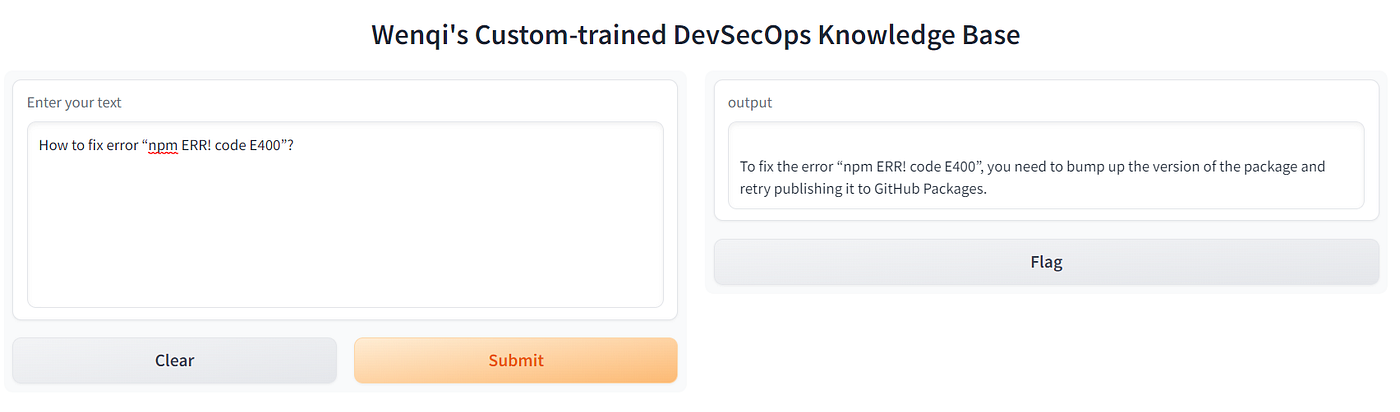
Asking it with a specific error encountered in the GitHub Actions workflow, we get the desired answer. See the following:
Now, let’s ask if our knowledge base can answer questions on Harden Runner:
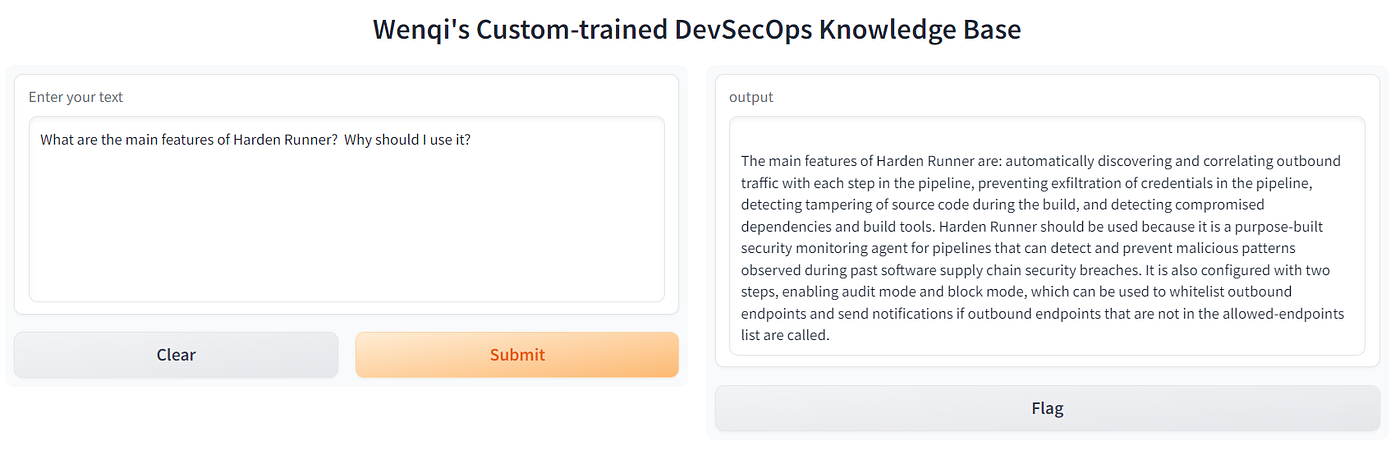
Right on! I am amazed at how accurate the answer is. Next, let’s see if our knowledge base can output a code snippet:
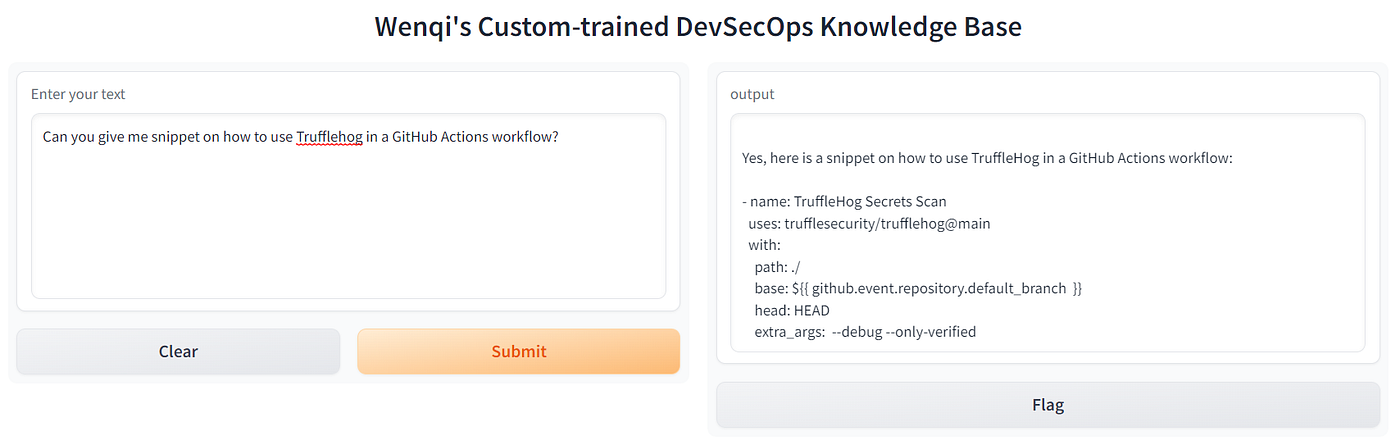
This one works like a charm!
Now, let’s attempt a negative scenario: let’s try to ask a question that is not in the provided source documents:
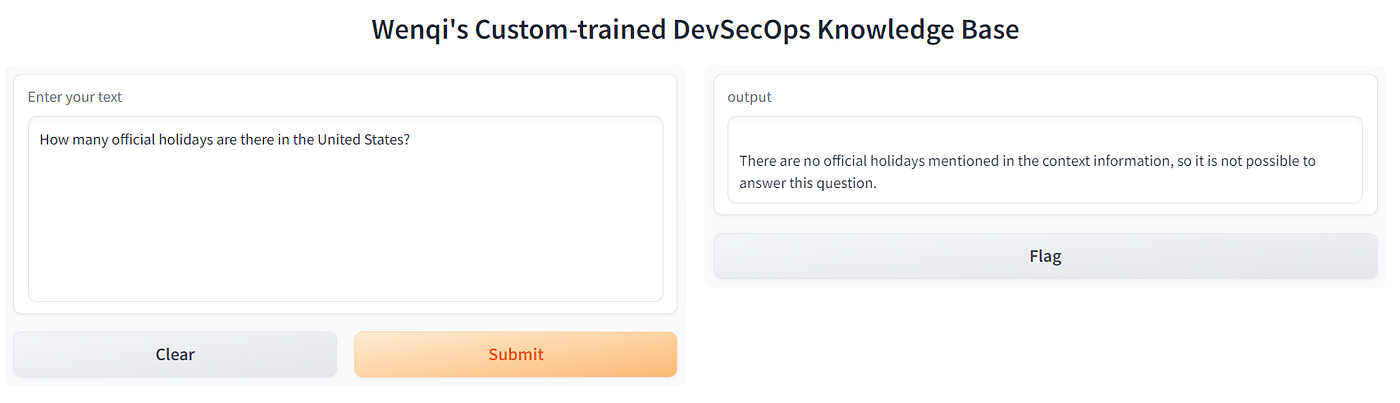
Job well done! LlamaIndex seems to have a guardrail in place against hallucination, which is a confident response by an AI that does not seem justified by its training data, either because it is insufficient, biased, or too specialized.
Does This AI Bot Expose My Private Data to OpenAI?
The answer is no. Per OpenAI privacy policy on API:
OpenAI does not use data submitted by customers via our API to train OpenAI models or improve OpenAI’s service offering.
Both our functions, data_ingestion_indexing for data ingestion/indexing and data_querying for Q&A, invoke OpenAI APIs via LangChain, so we can rest assured that OpenAI does not use our private data per their privacy policy on API mentioned above.
A Note on Cost
As you may already know, using OpenAI models does incur a cost. In our use case, we use its embedding model during data ingestion/indexing, and chat model for data querying. Here are the pricing details:
- For embedding model
text-embedding-ada-002: $0.0004 / 1K tokens - For chat model
gpt-3.5-turbo: $0.002 / 1K tokens
Here is a screenshot of my OpenAI usage while working on this chatbot:
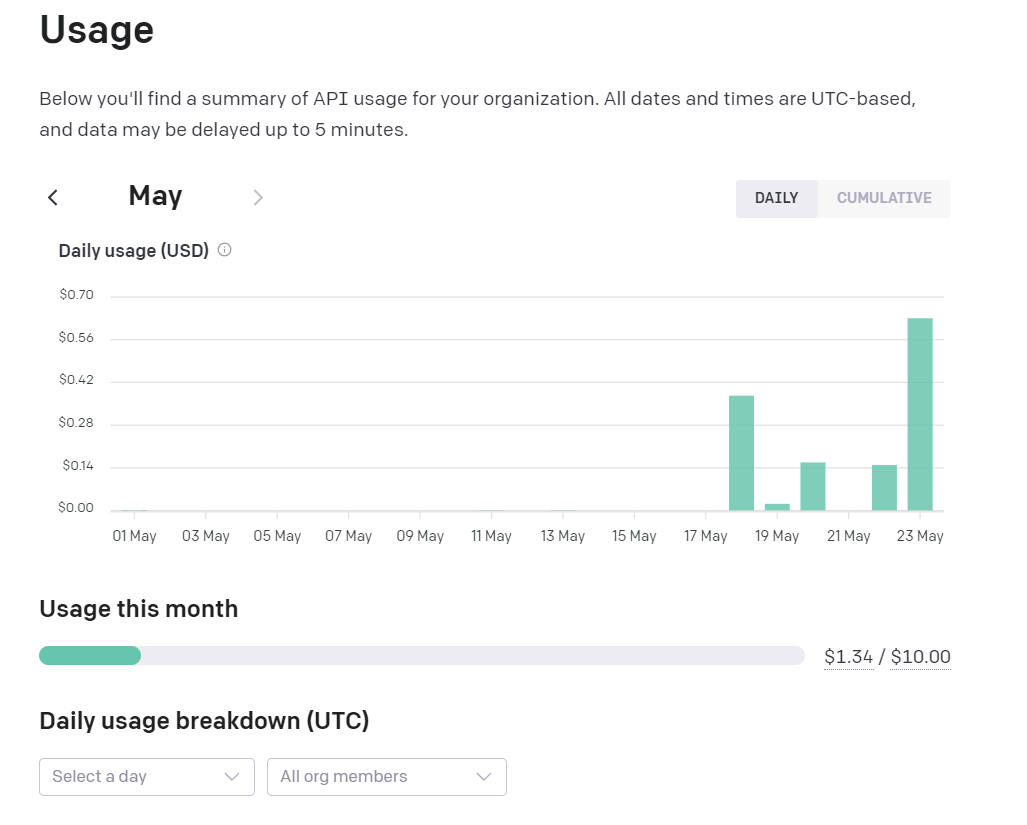
If you plan to use OpenAI LLMs, I strongly encourage you to configure a usage limit on OpenAI’s Usage Limit page, where you can define a hard limit and soft limit, so you manage your usage properly.
Summary
This article explored how to build a customized DevSecOps knowledge base chatbot. This is a mere proof of concept. The potential of incorporating LlamaIndex and LangChain into building apps that harness the power of LLMs through private data is limitless!
The source code for this article can be found in my GitHub repo.
Happy coding!