105 lines
4.0 KiB
Markdown
105 lines
4.0 KiB
Markdown

|
---
|
|||
|
|
page-title: "How to Install AMD OpenCL Mining Drivers on Debian 11 Bullseye"
|
|||
|
|
url: https://dazeb.uk/how-to-install-amd-opencl-mining-drivers-on-debian-11/
|
|||
|
|
date: "2023-03-27 17:27:49"
|
|||
|
|
---
|
|||
|
|
This is a new one that works great and Debian is a super stable Linux variation that’s mostly compatible with Ubuntu but does not include any bleeding edge software. Debian is stable and that’s the whole point. It’s great for server installations and mining rigs.
|
|||
|
|
|
|||
|
|
Let’s install Debian 11.
|
|||
|
|
|
|||
|
|
You can install Debian 11 from USB using programs like [Ventoy](https://www.ventoy.net/), [Rufus](https://rufus.ie/en/)
|
|||
|
|
|
|||
|
|
If you are using Linux you can write the image using dd.
|
|||
|
|
|
|||
|
|
`sudo dd if=debian-11.3.0-amd64-netinst.iso of=/dev/sd* bs=1024k status=progress`
|
|||
|
|
|
|||
|
|
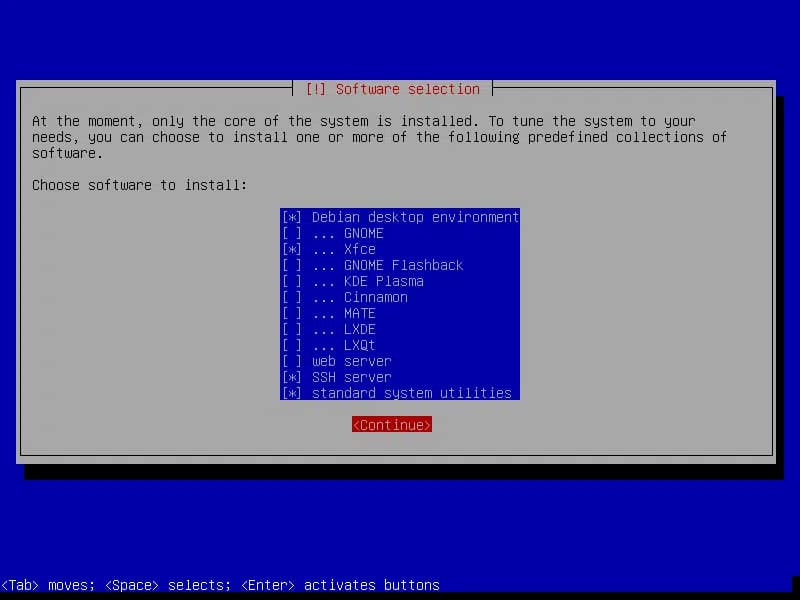
You will be asked if you want to install a desktop environment during the installation. The preferred option is to use the desktop environment with XFCE and SSH.
|
|||
|
|
|
|||
|
|
|
|||
|
|
|
|||
|
|
Debian 11 Xfce Desktop Installer
|
|||
|
|
|
|||
|
|
Once completed you will be presented with the desktop. I use the root account for this install.
|
|||
|
|
|
|||
|
|
Open the terminal and do an update to check it’s fully updated.
|
|||
|
|
|
|||
|
|
`apt update && apt-upgrade -y`
|
|||
|
|
|
|||
|
|
## Add Non-Free Repository Sources
|
|||
|
|
|
|||
|
|
Add the non-free repositories to Debian `/etc/apt/sources.list`
|
|||
|
|
|
|||
|
|
You can use `nano /etc/apt/sources/list`
|
|||
|
|
|
|||
|
|
Edit the file to look like the below. You are just adding `contrib non-free` to each line.
|
|||
|
|
|
|||
|
|
```
|
|||
|
|
deb http://deb.debian.org/debian/ bullseye main contrib non-free
|
|||
|
|
deb-src http://deb.debian.org/debian/ bullseye main contrib non-free
|
|||
|
|
|
|||
|
|
deb http://security.debian.org/debian-security bullseye-security main contrib non-free
|
|||
|
|
deb-src http://security.debian.org/debian-security bullseye-security main contrib non-free
|
|||
|
|
|
|||
|
|
# bullseye-updates, to get updates before a point release is made;
|
|||
|
|
# see https://www.debian.org/doc/manuals/debian-reference/ch02.en.html#_updates_and_backports
|
|||
|
|
deb http://deb.debian.org/debian/ bullseye-updates main contrib non-free
|
|||
|
|
deb-src http://deb.debian.org/debian/ bullseye-updates main contrib non-free
|
|||
|
|
```
|
|||
|
|
|
|||
|
|
## Installing AMD GPU Firmware
|
|||
|
|
|
|||
|
|
Update the packages. Feel free to fully update and upgrade if you like. It won’t make any difference.
|
|||
|
|
|
|||
|
|
```
|
|||
|
|
apt update
|
|||
|
|
```
|
|||
|
|
|
|||
|
|
Next, we install the non-free graphic cards drivers with:
|
|||
|
|
|
|||
|
|
```
|
|||
|
|
apt install firmware-linux-nonfree
|
|||
|
|
```
|
|||
|
|
|
|||
|
|
**You may get some errors about missing firmware**. You can safely ignore it we won’t be needing it anyway.
|
|||
|
|
|
|||
|
|
Non-free means, not open source, AMD drivers are proprietary so hence the non-free part. It doesn’t mean you have to pay anything means that the software cannot be distributed and or modified, sold etc.
|
|||
|
|
|
|||
|
|
## Downloading AMD GPU OpenCL Drivers
|
|||
|
|
|
|||
|
|
Next, we can go down the familiar route explained in previous guides. Download the old AMD drivers and install them with the following commands.
|
|||
|
|
|
|||
|
|
```
|
|||
|
|
# Change to a directory to download the file
|
|||
|
|
cd Downloads
|
|||
|
|
# Download the tar file of AMD drivers
|
|||
|
|
wget https://drivers.amd.com/drivers/linux/amdgpu-pro-20.40-1147286-ubuntu-20.04.tar.xz --referer https://www.amd.com/en/support/kb/release-notes/rn-amdgpu-unified-linux-20-40
|
|||
|
|
# unzip the tar
|
|||
|
|
tar -xJpf amdgpu-pro-*.tar.xz
|
|||
|
|
# cd into the directory
|
|||
|
|
cd amdgpu-pro-20.40-1147286-ubuntu-20.04
|
|||
|
|
```
|
|||
|
|
|
|||
|
|
## Installing AMD GPU OpenCL Drivers
|
|||
|
|
|
|||
|
|
Next, the command to install only the OpenCL drivers
|
|||
|
|
|
|||
|
|
```
|
|||
|
|
./amdgpu-install --opencl=legacy --headless --no-dkms
|
|||
|
|
```
|
|||
|
|
|
|||
|
|
The command should complete without error.
|
|||
|
|
|
|||
|
|
At this point, you can use `clinfo` to see if it recognises your gfx card.
|
|||
|
|
|
|||
|
|
```
|
|||
|
|
apt install clinfo
|
|||
|
|
clinfo
|
|||
|
|
```
|
|||
|
|
|
|||
|
|
Your computer should be mining now using Debian 11. This method was tested on RX 580 and works every time.
|
|||
|
|
|
|||
|
|
## Complete!
|
|||
|
|
|
|||
|
|
At this point, you could install CoreCtl to overclock your cards in a GUI application.
|
|||
|
|
|
|||
|
|
The Install for CoreCtl is at the [bottom of another guide I wrote](https://dazeb.uk/how-to-install-amd-opencl-gpu-drivers-on-ubuntu-21-04-for-mining-ethereum/#corectl).
|